
When you introduce a new line in manufacturing or fill a role with someone new, you face the question of how to capture the existing workflow in a way everyone can follow and apply consistently. Without a clear structure, responsibilities, interfaces, and checkpoints often live only in the heads of a few employees. That creates uncertainty during staff changes or audits. This article shows you how to build a process description step by step, which elements it needs, and how digital documentation helps you create a solid structure from the start.
Key takeaways
A process description and a work instruction serve different purposes and complement rather than replace each other.
A complete process description covers control, roles, resources, metrics, and safety aspects.
Clause 4.4 of ISO 9001 requires effective process control, but no fixed document format.
Creating one works best in three phases: planning, drafting, and validating it in daily operations.
Digital documentation avoids the typical weaknesses of paper, such as version chaos and a lack of transparency.
What Is a Process Description?
A process description documents how individual process steps connect into an overarching workflow. Anyone creating a process description defines who does what, when, with what, and based on which information. This creates the organizational foundation for consistent execution on the shopfloor.
The starting point is a systematic process analysis. It defines the start and end of the process, assigns responsibilities, and describes the relationships between inputs, activities, and results. It also covers decisions, approvals, checks, and interfaces to upstream or downstream processes.
A good process description answers five core questions:
Who is responsible?
Which activities and decisions are required?
In what order do they happen?
Which equipment, data, and documents does the team need?
How does the company recognize a correct process outcome?
The level of detail depends on risk, complexity, and audience. A cross-departmental approval process needs a different format than a short setup procedure on a single machine.
What Is the Difference Between a Process Description and a Work Instruction?
A process description shows the overall context of a process, while a work instruction spells out concrete activities at a specific workstation. The process description governs interfaces and responsibilities, while the work instruction supports error-free execution of individual work steps.
| Criterion | Process description | Work instruction |
|---|---|---|
| Level of view | Whole process or sub-process | Single activity or work sequence |
| Typical question | Who does what, when, with what, and with which result? | How does a person correctly carry out the work step? |
| Level of detail | Overview of flow, roles, handoffs, and controls | Concrete actions, parameters, tools, and checks |
| Area of use | Quality management, process management, cross-departmental control | Assembly, manufacturing, inspection, maintenance, setup, and repair |
| Format | Flowchart, swimlane diagram, table, or structured text | Sequence of steps with text, images, videos, warnings, and checkpoints |
| Responsibility | Process owners and involved functions | Subject matter owners, work preparation, or industrial engineering |
Both document types safeguard recurring workflows and operational knowledge. However, they don't replace each other. An 8D complaint process needs a process description for roles, escalations, and approvals. Checking a torque value, on the other hand, needs a work instruction with a tool, target value, tolerance, measurement method, and response to deviations.
Recommendation: Use the process description as the governing framework. At execution-level steps, link the matching work instruction, inspection instruction, or checklist. When you need to guide someone through individual actions in detail, the work instruction is the better tool.
What Are Examples of Process Descriptions in Manufacturing?
Typical process descriptions govern assembly, manufacturing, inspection, maintenance, and repair and adjustment. What matters isn't the name of the document but whether it clearly describes the workflow, the people involved, the interfaces, and the expected result.
Assembly process: material staging, variant identification, assembly sequence, poka-yoke, torque check, and release.
Manufacturing process: order acceptance, setup, first-article approval, machining, in-process inspection, feedback, and handover.
Inspection process: sample size, inspection equipment, characteristics, tolerances, documentation, and response plan for deviations.
Maintenance process: trigger by time or condition, lockout/tagout, maintenance activities, functional check, and handover back to production.
Repair process: fault report, diagnosis, spare part supply, repair, safety check, and restart.
Adjustment process: reference state, parameters, permissible adjustment ranges, verification measurement, and release.
Deviation process: hold, tagging, root cause analysis with Ishikawa or 5-Why, rework decision, and effectiveness check.
Automotive plants also run processes for advance quality planning, FMEA, production control plans, sample approval, and traceability. In regulated environments, evidence requirements and formal approvals shape how much detail is needed.
What Five Aspects Must a Good Process Description Cover?
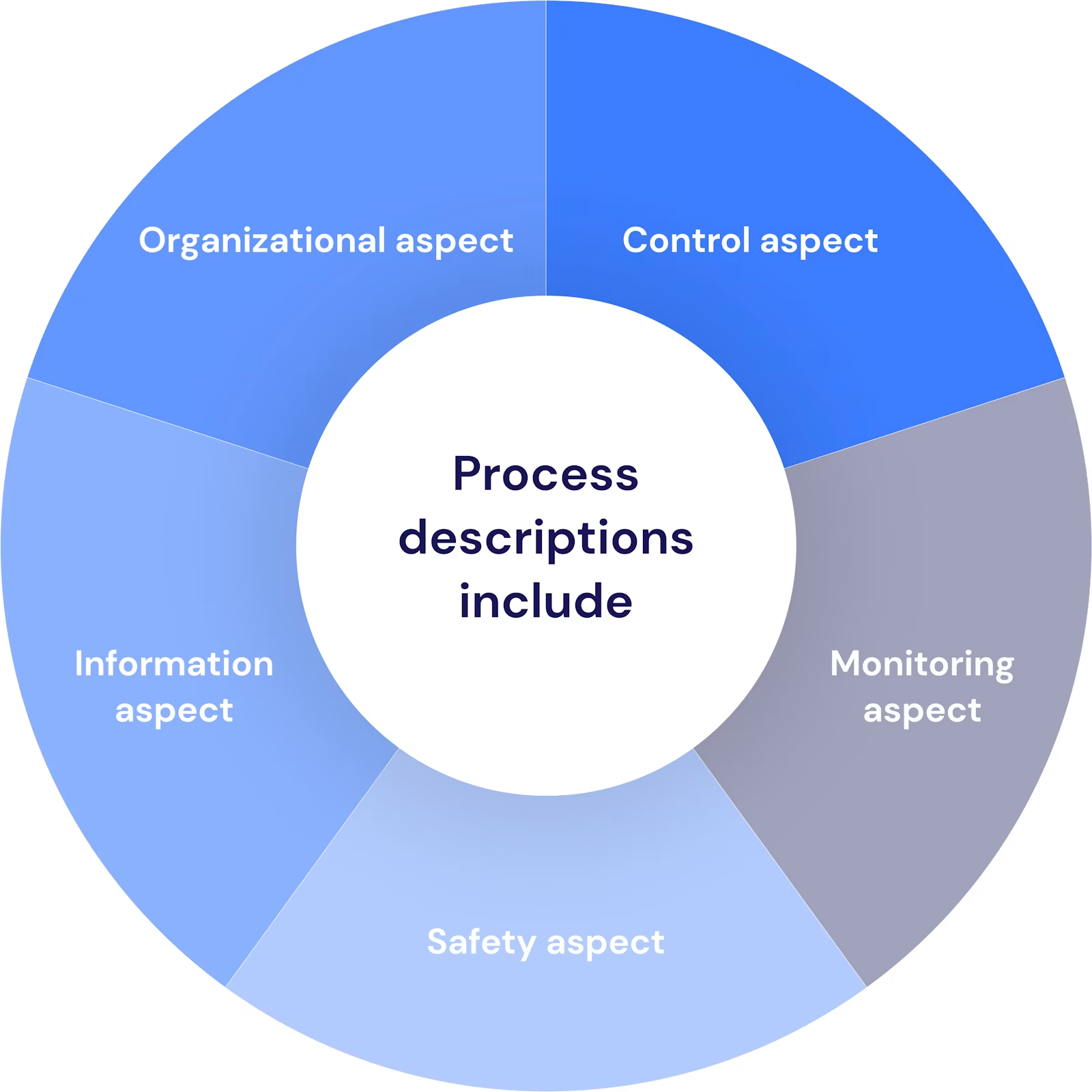
A solid process description combines control, organization, information, monitoring, and safety. If one of these aspects is missing, the workflow stays unclear, unmeasurable, or operationally risky.
Control aspect: The description sets the sequence, handoffs, decisions, and escalation paths. This prevents duplicate work, unresolved wait times, and recurring error sources.
Organizational aspect: It assigns activities, approvals, and decision authority to specific roles or functions. Phrases like "the responsible department" aren't specific enough.
Information aspect: It names all data and documents a role needs to carry out the work, such as the manufacturing order, drawing revision, bill of materials, inspection plan, or safety data sheet.
Monitoring aspect: It defines criteria, measurement points, and metrics for quality, time, and cost, such as first pass yield, scrap rate, cycle time, and on-time delivery.
Safety aspect: It builds in protective measures, legal requirements, work instructions, approvals, and responses to hazards. Requirements from occupational safety, ISO 45001, or the company's lockout/tagout procedure shouldn't live only in separate documents.
In practice, a simple check works well: every activity must serve at least one process goal and have a clear owner. Non-value-adding steps stay in the process only when quality, compliance, traceability, or safety require them.
What Elements Must a Process Description Include?
A complete process description includes master data, an objective, scope, inputs and outputs, workflow, responsibilities, metrics, and related documents. This structure makes the process executable, auditable, and maintainable.
Process name and unique identifier: A consistent name prevents mix-ups in the QM system, ERP, or document control.
Process objective and value: The objective describes the expected result, not just the activity. "Released, spec-compliant first articles" is more meaningful than "inspect first articles."
Start, end, and scope: These define product families, plants, lines, shifts, and exceptions.
Input and input supplier: Examples include the order, material, drawing, machine data, and customer requirement.
Output and recipient: Examples include a released component, an inspection record, a status message, or blocked material.
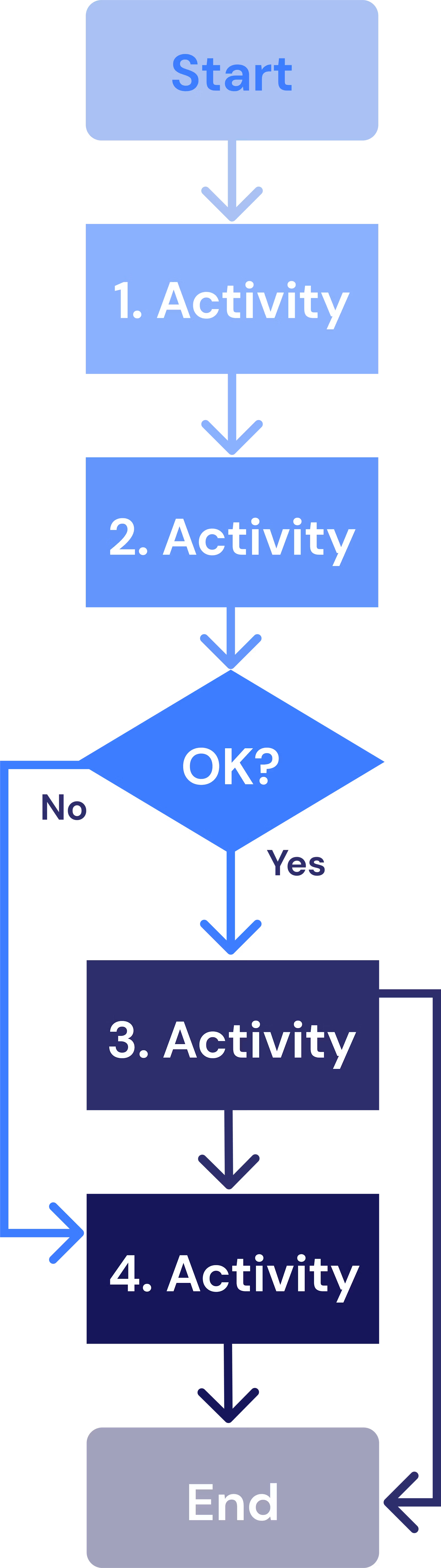
Process visualization: A flowchart or swimlane diagram shows the sequence, decisions, loops, and handoffs. Supporting text should only explain what the diagram doesn't convey clearly.
Roles, responsibilities, and authorities: The process names execution, approval, escalation, and process ownership separately.
Resources and equipment: This includes staff qualifications, machines, tools, inspection equipment, software, and required infrastructure.
Criteria and process metrics: Target values, tolerances, measurement method, measurement frequency, and a response plan make performance measurable.
Risks, controls, and safety requirements: FMEA measures, poka-yoke, checks, approval points, and personal protective equipment belong at the affected step.
Related documents: The process description clearly references work instructions, inspection plans, forms, and procedures.
Control data: Version, status, author, approver, validity date, and change history secure traceability.
A clear document hierarchy matters here. The process description explains the context, the work instruction explains execution, and the form or system captures the record.
What Does ISO 9001 Require for Process Descriptions?
ISO 9001, in clause 4.4, requires an organization to determine, apply, maintain, and continually improve the processes needed for its quality management system. The standard doesn't prescribe a specific layout or a separate document titled "process description" for every operational workflow.
For the relevant processes, the organization must in particular determine:
required inputs and expected results,
the sequence and interaction of the processes,
criteria and methods for effective operation and control,
measurements and related performance indicators,
required resources and their availability,
responsibilities and authorities,
risks and opportunities and the actions defined for them,
evaluation of the processes and necessary changes,
opportunities for improvement.
Clause 4.4 also requires documented information to the extent needed to support process execution and to build confidence that the processes run as planned. The company determines this extent based on complexity, risk, employee competence, and the need for evidence.
The most common mistake here is equating conformity with the standard to the largest possible volume of documents. ISO 9001 requires effective process control, not paper production. A quality-critical welding process, a traceability chain, or a safety-relevant approval needs precise documentation. A simple, well-controlled workflow needs less depth.
Additional management systems raise the technical requirements. In the automotive sector, IATF 16949 adds requirements around customer requirements, traceability, and production control. ISO 45001 adds requirements for occupational health and safety. An integrated management system should run shared process steps only once and add discipline-specific controls where needed.
Which Three Phases Lead to a Finished Process Description?
A process description takes shape in three sequential phases: planning, drafting, and deployment and validation. The order matters, because a well-formatted document without a clear goal, a real process capture, and a practical test only reflects an assumed target process.
Phase 1
In the planning phase, the team clarifies the audience, process boundaries, complexity, and existing documentation. It captures the real workflow first and only then decides what structure the target process needs.
Define purpose and audience: Determine whether shopfloor employees, shift leads, quality management, auditors, or process planners will use the document. Non-specialist users need more context than experienced specialists.
Define start, end, and result: Set the trigger and completion clearly. A maintenance process, for example, starts with a due work order and only ends with a documented functional check and equipment release.
Capture the current process: Observe the work where value is created and interview the people who perform it. ERP records or old QM manuals often show only the formal workflow.
Break down complexity sensibly: Divide long workflows along functional handoffs, decisions, or clear intermediate results. Sub-processes must still form a closed process chain together.
Assess existing documents: Check work instructions, inspection plans, FMEAs, production control plans, and forms for currency and contradictions.
Build a cross-functional team: Process owners lead the work. Quality management, industrial engineering, work preparation, maintenance, occupational safety, and experienced operators contribute the necessary expertise.
A workshop right on the shopfloor works well in practice. The team flags variants, media breaks, wait times, questions, and informal workarounds. That's often where the most valuable improvement ideas surface.
Phase 2
In the drafting phase, the team turns the agreed target process into a consistent, understandable, and visually supported structure. It documents as much detail as necessary and as little as possible.
Use a standard template: Use the same fields, symbols, naming conventions, and role terms for comparable processes.
Present the main flow first: Describe the standard case in chronological order. Rare exceptions get a clear branch or a linked supplementary document.
Write actively and clearly: Write "the shift lead blocks the order" rather than "the order is to be blocked." Every step includes an activity, a role, and a verifiable result.
Separate operations from process steps: A process step describes a functional change of state or a handoff. Individual actions belong in the linked work instruction.
Keep the scope manageable: Stay under about 20 steps in the main flow where possible. Split longer workflows into clearly named sub-processes without hiding risks or decision points.
Add the right media: Flowcharts explain logic and interfaces. Images show target states and positions. Short videos convey movements. Tables suit parameters and limits.
Build in controls: Place checkpoints, approvals, escalations, and response plans right where a deviation can occur.
Add document control: Capture version, approval status, validity, reason for change, and affected variants.
Avoid long blocks of running text. Bullet points, short sentences, and consistent verbs make the document easier to scan during work. Terms like "promptly," "sufficient," or "if needed" need a measurable criterion or a clearly named decision authority.
Phase 3
In phase 3, the team tests the process description under real conditions, releases it in a controlled way, and improves it based on metrics and user feedback. Only safe execution in daily operations confirms that the content and format actually work.
Run a pilot: Have both experienced and newly trained employees carry out the process using the description. Watch for questions, workarounds, and deviations.
Approve it technically and formally: Process owners confirm technical accuracy. Quality management checks document control and QM requirements. Occupational safety or other relevant roles approve risk-related content.
Make it available at the point of use: The valid version must be reachable at the machine, line, or mobile device without a long search. Superseded versions must not remain in circulation.
Train the people affected: A new version requires information or training whenever activities, parameters, risks, or responsibilities change. The company documents the required evidence.
Monitor performance: Compare productivity, cycle time, scrap, rework, and deviations against a solid baseline.
Handle feedback: Employees report unclear steps and improvement ideas with a direct reference to the process step. The process owner evaluates, prioritizes, and responds to each report.
Confirm effectiveness: After a defined observation period, the team checks whether the change achieved its goal and didn't introduce a new source of error.
Recommendation: Start with a quality-relevant process that runs frequently and has a manageable number of variants. That's where you can properly test clarity, approval rules, and metrics before rolling the method out to other areas.
Why Should Process Descriptions Stay Under 20 Process Steps?
Fewer than 20 steps in the main flow is a practical design rule, not a requirement in ISO 9001. The limit improves overview and readability, as long as the team splits a long process sensibly and doesn't cut critical content.
Very long flow diagrams force users to search, scroll, and jump back frequently. Decision points get lost among the details. Maintenance effort also rises, because every variant duplicates numerous near-identical steps.
When a workflow clearly exceeds the limit, the team should:
form sub-processes around clear intermediate results,
extract reusable modules,
control variants through rules instead of document copies,
move individual actions into work instructions,
handle rare fault cases through clearly defined branches.
The most common mistake is a cosmetic cut. Safety measures, quality checks, and escalation rules should remain fully intact. What matters is the cognitive manageability of the workflow, not hitting an arbitrary number.
What Value Do Images and Videos Add Compared to Plain Text?
Images and videos convey spatial arrangement, target states, and sequences of movement faster and more clearly than long blocks of text. They improve understanding especially for assembly positions, tool guidance, inspection characteristics, and visible defect patterns.
Each medium serves a different purpose:
Flowcharts show sequence, decisions, loops, and interfaces.
Marked-up images highlight installation points, inspection areas, connection positions, and pass/fail patterns.
Pictograms flag hazards, mandatory checks, tools, or personal protective equipment.
Short videos show complex movements, setup sequences, or ergonomic actions.
Text and tables remain essential for exact parameters, tolerances, torque values, material numbers, and response rules.
A video alone isn't solid process documentation. Users find it hard to search for a single parameter in a video, and small product details go out of date quickly. In practice, the best combination is a short text instruction, a marked-up image, structured target values, and a video only where movement really matters.
Who Is Responsible for Creating, Approving, and Maintaining a Process Description?
Overall technical responsibility sits with the named process owner, not with quality management by default. Quality management governs methodology and document control, while industrial engineering, specialist departments, and shopfloor employees develop and check the operational content.
| Role | Main responsibility |
|---|---|
| Process owners | Objective, performance, interfaces, technical approval, and continuous improvement |
| Quality management | Templates, QM compliance, document control, audit readiness, and moderation |
| Industrial engineering or work preparation | Workflow design, time management, equipment, variant logic, and standardization |
| Shift leads and experienced operators | Practical testing, clarity, deviations, and improvement suggestions |
| Occupational safety | Hazards, protective measures, approval procedures, and links to work instructions |
| Maintenance, logistics, or IT | Technical input at the relevant interfaces and system integration |
| Document owners | Publication, versioning, archiving, and distribution of valid versions |
A RACI matrix adds clarity for cross-departmental processes. Exactly one role should be accountable per decision. Multiple approvers with equal authority otherwise lead to delays and unclear escalations.
Maintenance needs fixed triggers. These include product changes, new machines, changed inspection characteristics, FMEA actions, complaints, accidents, audit findings, and insights from continuous improvement. The company also sets risk-based review intervals.
What Advantages Does a Structured Process Description Bring to the Manufacturing Workflow?
A structured process description stabilizes quality, productivity, cost, and safety, because it standardizes activities, interfaces, and responses to deviations. Its value only appears once the documented workflow matches the approved target process and the team actually uses it on the shopfloor.
The most important operational advantages are:
Consistent execution: Shifts and sites work by the same approved rules.
Fewer process errors: Clear inputs, checkpoints, and response plans reduce omissions, mix-ups, and duplicate work.
More stable quality: Target values, tolerances, and approvals support a consistent process outcome and raise first pass yield.
Higher productivity: Clear handoffs cut down on questions, search time, rework, and unplanned waiting.
Lower cost of quality: Early checks catch deviations before the next stage of value creation.
Better safety: Protective measures and decision authority appear directly in the workflow instead of only in a separate manual.
A solid basis for process improvement: A defined standard gives continuous improvement, 5S, standardized work, FMEA, and root cause analyses with Ishikawa or 5-Why a starting point.
A process description doesn't improve an unsuitable workflow just by documenting it. The team should remove unnecessary approvals, loops, and media breaks before standardizing. Otherwise it locks in waste with a clean layout.
What Value Do Employees Get from Onboarding, Knowledge Transfer, and Satisfaction?
Employees benefit from consistent onboarding, faster access to process knowledge, and clear decision boundaries. Understandable standards reduce dependence on individual experience without devaluing that expertise.
New employees get the same approved workflow instead of shift-dependent verbal instructions. Images, pass/fail examples, and clearly named checkpoints reduce complexity. Experienced employees gain a shared basis for training, shift handover, and improvement work.
Involvement is key to acceptance. The people who run a process every day spot missing tools, unrealistic sequences, and unnecessary steps sooner than a purely documentation-focused role. A visible feedback status shows that the responsible people review input rather than letting it disappear into an anonymous list.
A tightly scripted instruction still isn't right for every situation. For standardizable, quality-critical tasks, it protects against errors. For diagnostics, troubleshooting, or expert work, the team also needs decision rules and room for qualified judgment.
What Strategic Value Do Process Descriptions Bring to a Company?
Process descriptions make operational knowledge scalable and reduce dependence on individual knowledge holders. This supports faster production ramp-ups, plant expansion, site standardization, and a more robust response to staff turnover or external disruptions.
When setting up a new line, a company transfers not only machines and bills of materials but also approval logic, quality controls, roles, and experiential knowledge. Standardized core processes speed up this transfer. Local variations remain possible but need a technical justification, for example legal requirements, customer specifications, or different equipment.
In the face of skilled labor shortages, process documentation acts as a multiplier for qualification. It replaces neither training nor experience, but it shortens the search for information and supports consistent onboarding. During supply shortages or short-notice variant changes, a well-maintained process structure makes it easier to adjust affected workflows in a controlled way.
Documentation becomes strategically valuable when a company builds processes modularly. Reusable inspection, safety, or setup modules cut maintenance effort and keep global standards consistent.
What Disadvantages and Risks Do Paper-Based Process Descriptions Have?
Paper-based process descriptions cause high distribution and maintenance effort and offer little transparency into usage, progress, and currency. With many languages, sites, and product variants, the risk rises that employees work from an outdated or unsuitable version.
Typical weaknesses include:
text-heavy formats with limited use of images and no directly embedded video,
manual formatting effort in Word, Excel, or PDF,
media breaks between ERP, the QM system, printouts, handwritten feedback, and re-entering data,
costly creation and distribution of variant-specific documents,
separate translations without reliable synchronization to the source document,
no real-time status on the order, process progress, and issues that occur,
hard-to-track acknowledgment and training after changes,
physical wear, loss, or uncontrolled copies at the workstation.
Paper still makes sense where explosion-hazard areas, hygiene requirements, missing network coverage, or defined emergency procedures rule out digital devices. Even then, the company needs controlled issuance, clear labeling, and a regulated process for withdrawing invalid copies.
How Does Digital Documentation Solve the Typical Weaknesses of Paper-Based Process Descriptions?
Digital documentation brings content, versions, variants, and feedback together in one governed system. It only eliminates paper problems when roles, approvals, master data, and integrations are set up cleanly.
| Requirement | Paper-based approach | Digital approach |
|---|---|---|
| Updating | Exchanging distributed printouts | Approval and controlled publication of a new version |
| Version security | Depends on manually withdrawing old copies | Only the version valid for the order and workstation is shown |
| Variants | Separate documents and copies | Rule-based assembly from approved modules |
| Multiple languages | Separate files with high effort to keep in sync | Linked language versions with a shared approval status |
| Media | Mostly text and static images | Text, markups, pictograms, images, videos, and checkpoints |
| System handoffs | Manual transfer between ERP, paper, and analysis | Interfaces to ERP, MES, QMS, or inspection equipment |
| Feedback | Handwriting, email, or a separate form | Reported directly at the affected process step |
| Transparency | Delayed or missing progress status | Near real-time status on processing, deviations, and approval |
| Traceability | Filing and manual research | Timestamp, version, user reference, and change history |
An ERP connection passes on the order, material, variant, and relevant master data. The documentation system then provides the approved content and returns results in a controlled way. This removes duplicate entry and transfer errors.
Digital systems also support modular content. When a shared safety step changes, the responsible role updates the approved module instead of numerous document copies. Translations stay linked to the source content, though qualified people still need to check safety- and quality-critical information.
Recommendation: Don't just digitize existing paper forms as PDFs. Rethink variants, approvals, feedback, and system handoffs from the ground up. Otherwise, version chaos simply moves from a folder into a shared drive.
How Does Operations1 Support Digital Process Documentation?
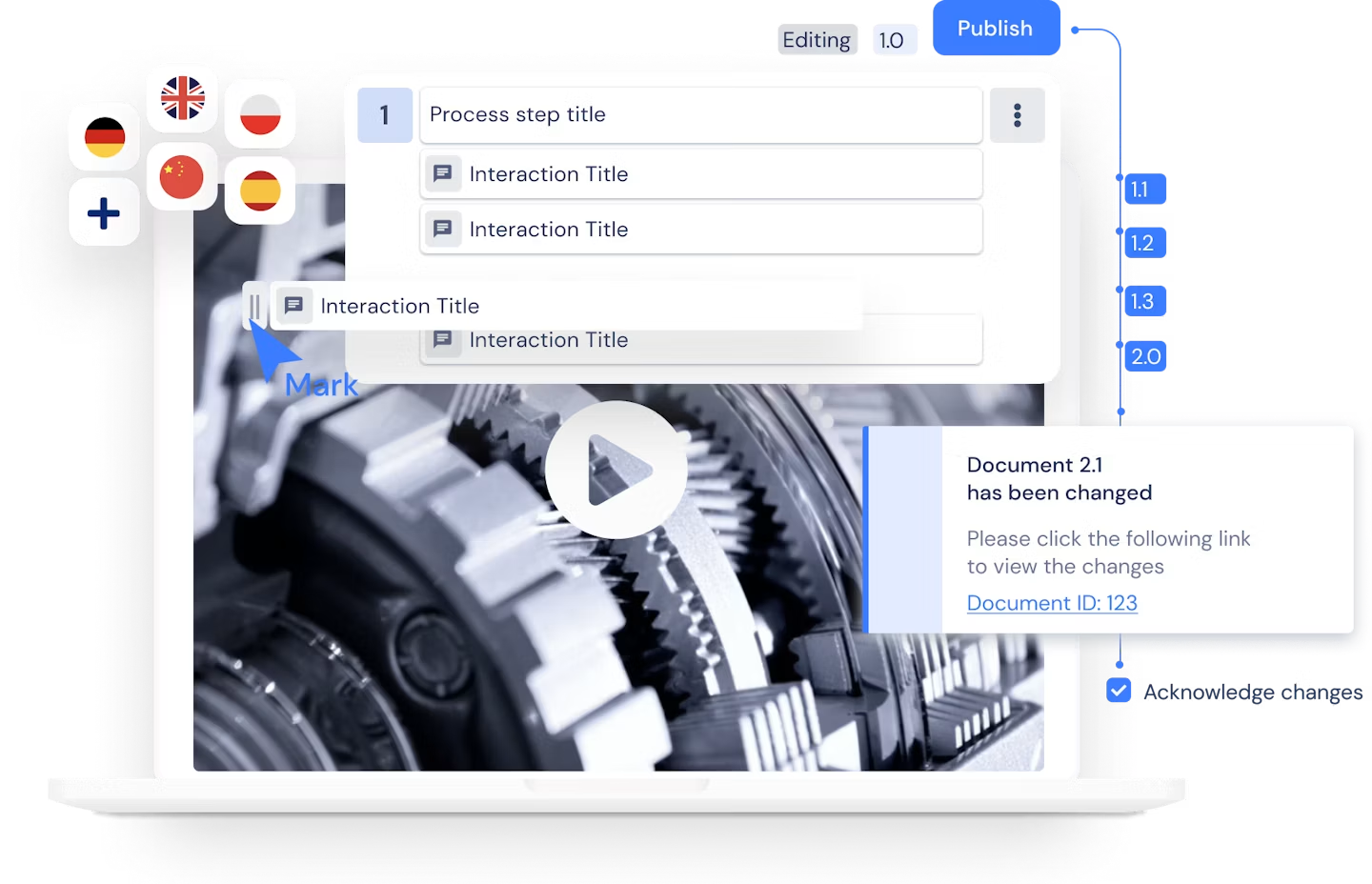
Anyone looking to close the gap between paper and a digital solution needs a system that brings content, versions, and approvals together in one place. Operations1 represents structured documents as operations and steps and embeds images, videos, and PDF files directly. The platform manages documents with full versioning and publishes new versions only after review.
With the Multilevel Review Process, you can configure as many approval levels as you need, for example department, quality, and plant management. Every version then goes through a traceable approval process before it reaches the workstation. With modular documents, you can represent product variants using digital work instructions software. When a shared module changes, Operations1 automatically applies the change to every parent document instead of maintaining multiple copies individually.
For multilingual sites, multilingual documentation keeps structure, images, and videos together in a single content version. The platform supports AI-based translation as well as an optional DeepL connector with a glossary for consistent terminology. Every run generates a report with a unique report ID linked to the document version used. The captured process information can be filtered, searched, analyzed, and exported.
Anyone who wants to see how this works for a specific process can map a pilot process with variants and approval levels and review the outcome in a conversation with Operations1.
Which Criteria Matter When Choosing a Digital Tool for Process Descriptions?
A suitable tool must combine easy content creation with solid document control, variant management, integration, and shopfloor usability. An attractive interface alone isn't enough if approvals, offline operation, or traceability are missing.
Evaluate solutions against a real pilot process and these criteria:
Creation and maintenance: Intuitive content creation, templates, reusable modules, bulk changes, and a clear separation of content and layout.
Media and interaction: Images, markups, pictograms, short videos, required fields, checkpoints, and digital signatures.
Document control: Versioning, role permissions, multi-level approval, validity control, change history, and archiving.
Variant management: Rule-based selection by product, order, plant, workstation, or equipment feature instead of copied individual documents.
Multiple languages: Linked language versions, a translation workflow, terminology management, and flagging of open translations.
Structure classes and scale: Mapping plants, areas, lines, products, and processes with global standards and controlled local additions.
Integration: Standard interfaces or APIs for ERP, MES, QMS, PLM, identity management, and relevant equipment.
Shopfloor readiness: Fast access, good readability, glove-friendly operation, barcode or QR code support, offline capability, and rugged devices.
Collaboration: Context-based issue reporting, task status, responsibility, escalation, and traceable handling.
Analytics: Progress, deviations, process times, mandatory checks, and exportable data for continuous improvement and audits.
IT and compliance: Information security, permission model, backups, system availability, logging, and defined data export.
Operating model: Administrative effort, training needs, support, total cost of ownership, and clear ownership of master data.
Before choosing a tool, define must-have, nice-to-have, and exclusion criteria. Test at least one process with variants, a change with approval, an offline scenario, and feedback from the shopfloor. The better solution is the one that creates the least ongoing maintenance effort in real operations while still ensuring safe execution.
How Do You Measure Success in Daily Operations with Metrics?
Success shows up in process performance, quality, usage, and response speed, not in the number of published documents. A solid measurement approach compares a baseline with the state after rollout and separates the effects of documentation from changes in product, staff, or equipment.
Suitable metrics include:
Productivity: Good units or completed orders per hour worked.
Process and cycle time: Time from the defined start to the end of the process, including processing and wait time.
First pass yield: The share of units that pass through the process without rework or repeat inspection.
Scrap and rework rate: The share of defective or reworked units out of the total.
Deviations per run: Process errors, skipped mandatory steps, or incorrect variant selection.
Onboarding time: Time until a person can perform the task independently and to the required quality.
Search and query effort: Time spent looking for information and the number of technical questions per order or shift.
Change lead time: Time from an approved technical change to its valid availability for everyone affected.
Feedback resolution time: Time between a report, evaluation, decision, and response.
Usage and acknowledgment rate: The share of relevant runs completed with the correct document version and required proof of acknowledgment.
OEE works as a top-level equipment metric, but it responds to availability, performance, and quality at the same time. It therefore doesn't prove on its own that a better process description caused a specific change. Complement OEE with more targeted process metrics, such as setup time, operator errors, first pass yield, or recurring faults.
An effective feedback process follows a fixed path: report at the affected step, technical evaluation, prioritization by risk, change and approval, informing those affected, and an effectiveness check. The shift lead and the process owner should discuss open points and recurring deviations regularly.
In practice, a small set of metrics covering quality, time, usage, and feedback works best. Too many metrics increase the effort to capture data and dilute decision-making. Every metric needs a clear goal, data source, owner, review rhythm, and a defined response to deviations.