
You are planning the assembly or inspection instruction for a new product variant and face a simple question: another document copy, or a rule-based solution? Without clear criteria, the number of individual documents grows out of control while maintenance effort and error risk on the shopfloor keep rising. This article explains how variant configuration works, which documents suit it, and how to recognize a solution that holds up in practice.
Key takeaways
Characteristics and values form the basis from which shared and variant-dependent modules are assembled.
Maximum lists and strike-through fields shift the variant logic onto the person doing the work and increase error risk.
Even a handful of characteristics with several values creates many combinations, and with them growing maintenance effort for individual documents.
A modular document structure reduces redundancy because the responsible team changes a single building block centrally.
Selection criteria such as operator guidance, rule model, integration capability and traceability decide whether a solution works in daily operations.
What is variant configuration for work instructions and checklists?
Variant configuration for work instructions and checklists means assembling content on a rule basis, driven by defined characteristics and their values. For every order this produces an assembly instruction, inspection instruction or checklist that contains only the work steps, inspection characteristics, limit values and media valid for that variant.
A characteristic describes a variable property, for example drive type, electrical power, size, destination country or equipment option. The value defines the concrete setting, for example electric drive, high power, size L or a version for the US market.
Variants share a common base and differ only in individual characteristics. A variant-ready work instruction therefore consists of two types of content:
Shared modules: work steps and inspections that apply to every variant
Conditional modules: content that appears only for specific characteristics or combinations of them
Product variant and process variant are not the same thing
The distinction between product and process variants is decisive. A product variant describes the result of the configuration, for example a machine with a particular motor, housing and control package. A process variant describes how people assemble, inspect, pack or commission that version.
Both levels are connected but not identical. A product option does not necessarily trigger a different process. Conversely, destination country, manufacturing site or inspection class can change the sequence without changing the product technically. A sound variant logic therefore maps product characteristics and process characteristics separately and connects them through traceable rules.
Which documents suit a variant-ready approach?
Any operational document whose content, sequence or mandatory entries depend on product characteristics, order data or process conditions suits a variant-ready approach. This covers work instructions as well as executable checklists and inspection routines subject to documentation requirements.
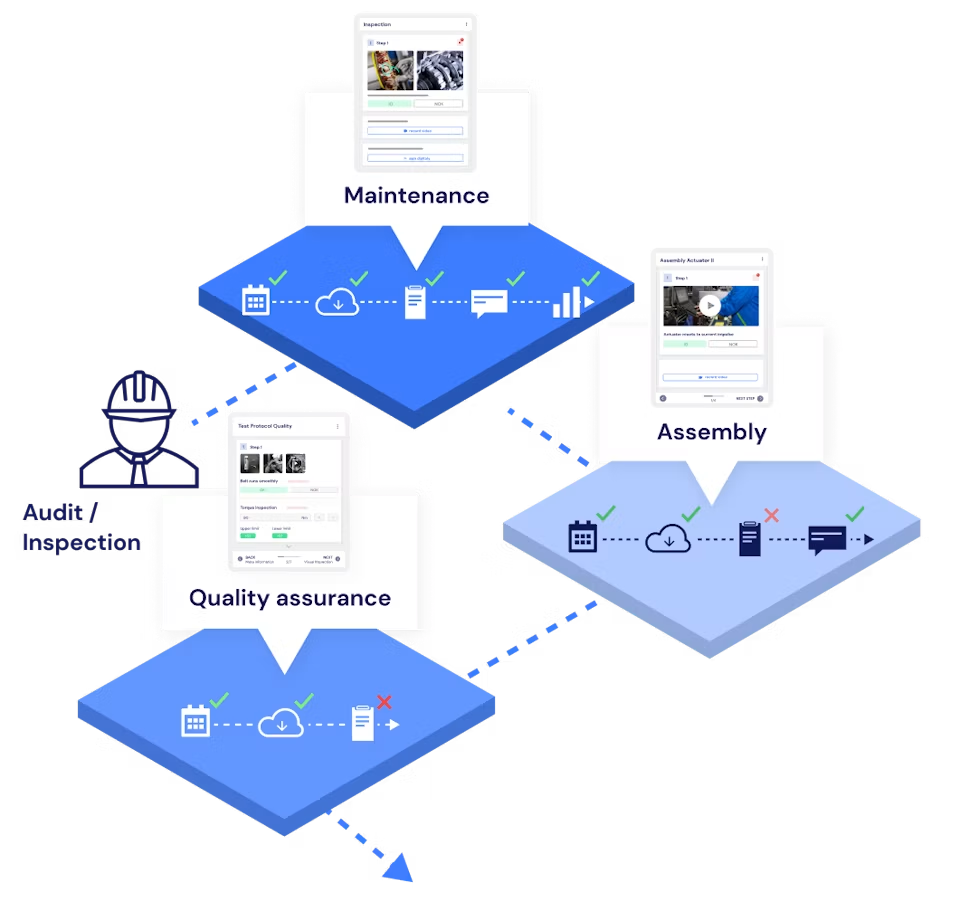
Review your own document landscape against these typical use cases:
Assembly instructions: selecting components, tools, torque values and assembly steps that match the version
Inspection instructions: providing the valid inspection characteristics, measuring equipment, tolerances and reaction plans
Assembly records: documenting target values, actual values, serial numbers and approvals per order
Commissioning records: selecting country-, customer- or plant-specific function tests
Quality checklists: checking the characteristics relevant to the specific product type and its risk class
Maintenance and inspection instructions: compiling activities based on plant configuration, running time or installed components
Packaging and shipping specifications: selecting markings, load securing and accompanying documents by destination country or transport mode
FAT/SAT documents: configuring acceptance points based on the agreed scope of delivery
Rework instructions: providing a defined sequence for the defect pattern, component variant and repair approval
Documents with recurring base steps and clearly describable deviations work particularly well. Teams can also run fully individual special processes digitally, but those need professional standardization first. Without stable terminology and unambiguous rules, a configurator simply digitizes the existing disorder.
Why maximum lists fail in variant-rich processes
Documents that are not variant-specific confront people with more information than their actual order requires. Maximum lists, strike-through fields and manual selection decisions increase documentation effort and shift responsibility for the variant logic onto the operator.
A maximum list contains every conceivable work step and inspection characteristic. The person carrying out the work has to recognize which points apply, which do not, and which limit values belong to the current version. That adds a decision step inside the operational process.
Several risks follow from this:
People overlook relevant inspection points or strike them out by mistake.
Fields that do not apply stay open and trigger queries during approval.
Different people interpret the same list differently.
On paper it is hard to tell whether an inspection point was not relevant, was forgotten, or failed.
Changes to variants or inspection requirements do not reliably reach every document copy.
Audits and root cause analyses become harder because the process version actually in force is not clearly identifiable.
For quality and audit requirements, what counts above all is controlled management of documented information and processes. Maximum lists make that evidence harder to produce, because validity, completeness and execution depend more heavily on individual decisions.
Example: inspecting a variant-rich industrial furnace
When inspecting a variant-rich industrial furnace, a maximum list shows every electrical inspection point and limit value across all power classes. The inspector has to strike out the fields that do not apply and assign the remaining values to the current furnace variant.
If a version has a different connected load or different electrical equipment, individual inspection steps, target values and measuring instruments change. On a universal paper list, all options still sit side by side.
The inspector therefore has to reconstruct the variant logic first and only then carry out the actual inspection. A missing entry stays ambiguous: the inspection point was either not relevant, the inspector forgot it, or deliberately left it out. A variant-specific inspection instruction resolves that ambiguity. It shows only the valid points and documents every required completion unambiguously.
How much effort does maintaining many document variants create?
The main effort does not come from writing alone, but from technical alignment, media production, review, approval and later updates. Anyone who wants to create a work instruction therefore has to consider the full document lifecycle.
The effort includes process capture, structuring, image production, wording of the steps, definition of inspection characteristics, plus review and approval. Translations, site-specific adjustments and questions from the shopfloor add to it.
Even a short adjustment turns into a scaling problem as soon as the same changed work step appears in many separate documents. Beyond the edit itself, the responsible team has to find every copy, update it, review it and approve it again.
The multiplier effect of variant complexity
Maintenance effort multiplies when the same technical change has to be repeated across numerous individual documents. A simple calculation makes the effect visible: if adjusting one document variant takes 1.5 hours, 64 separate variants add up to 96 hours. This figure is an assumption for the calculation, not a general benchmark.
Sixty-four variants appear faster than a variant list suggests. Six characteristics with two values each already produce 64 possible combinations. The same is true for three characteristics with four values each.
So do not calculate with the number of variants alone. Calculate with every dimension that multiplies:
Number of product variants
Number of document types to maintain
Number of languages
Number of plants or assembly lines
Frequency of technical changes
Number of customer-specific special approvals
The most common mistake here is looking only at the variants active today. For a sound assessment you also have to include change frequency, languages and sites. It is exactly this multiplication that pushes file-based individual documents past their economic limit.
What business risk arises when updates are skipped?
Companies that stop adapting work instructions to new variants because of the maintenance burden move process knowledge into people's heads, handwritten notes and informal agreements. That affects quality, scalability and delivery reliability, and it makes it harder to onboard new employees with digital work instructions.
When current information is missing, experienced specialists usually close the gap with their own knowledge. That only works as long as the right people are present and variant complexity stays manageable. At shift handover, during staff turnover or when ramping up a new site, that informal safety net disappears.
With tight staffing, the problem weighs even heavier. Qualified employees spend time copying, formatting and reconciling documents instead of improving processes, planning quality or analyzing root causes. At the same time, new colleagues need longer before they master complex variants without reliable guidance.
Word processing tools manage documents, but not robust relationships between characteristics, rules and process modules. They do not automatically recognize which instructions a technical change affects. That limit leads either to high control effort or to outdated information on the shopfloor.
There is a strategic dimension too: manufacturers of industrial goods have to deliver customer-specific work efficiently. Anyone managing variants purely through manual document work hits scaling limits as individualization grows.
How does a variant configurator work technically?
A variant configurator connects modular content with characteristics, values and selection rules. Once the order configuration is handed over, the system selects the valid modules, arranges them in the intended sequence and generates the matching work instruction or checklist.
The five layers of a robust variant logic
Characteristics and values: they describe the configuration-relevant properties, for example size, control system, power class or destination country.
Content modules: they hold individual work steps, inspection points, warnings, media, input fields and target values.
Rules and dependencies: they define for which characteristics a module appears, drops out or is replaced by another.
Context data: order number, serial number, bill of materials, workstation and process status complement the product configuration.
Output and execution: the system delivers the assembled instruction to the right workstation and captures results, deviations and approvals.
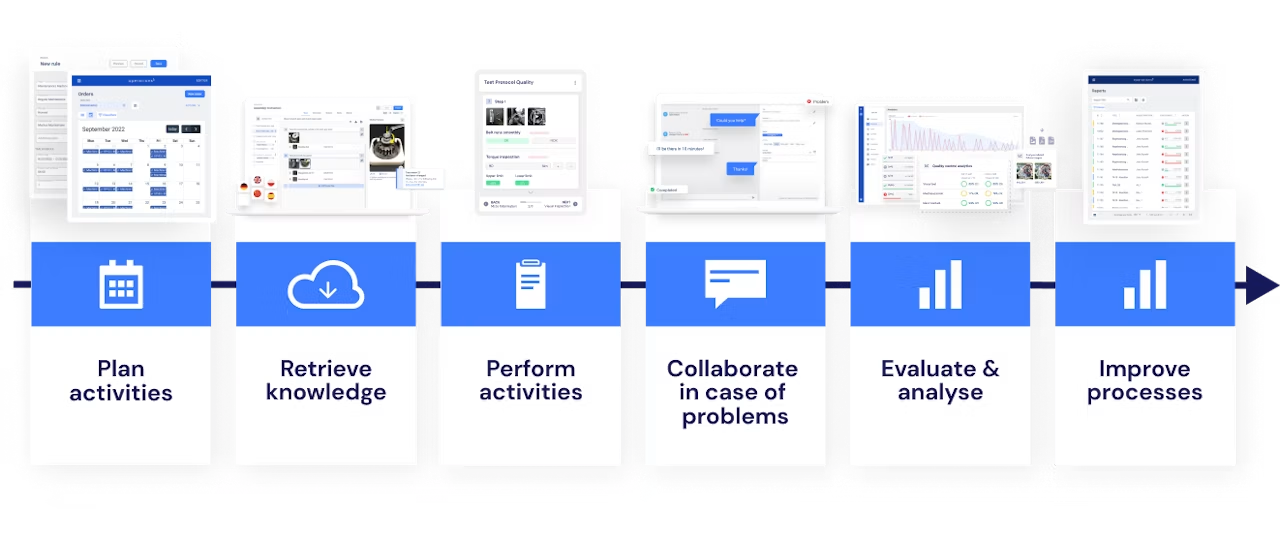
The common base of all variants sits in base modules. Variant-dependent steps carry conditions. One rule might read: show the inspection step for the additional interface only if the corresponding communication module is installed.
Complex rules also have to exclude invalid combinations. That includes dependencies, mandatory combinations and mutual exclusions. In practice, a comprehensible rule structure with reusable characteristics works better than a large number of nested special rules.
Modular document structure instead of one document per variant
A modular document structure stores recurring content once and reuses it on a rule basis across every matching variant. Redundancy and maintenance effort drop, while the responsible team keeps central control over changes and translations.
Modularization needs clear design rules. Modules that are too large still create redundancy, modules that are too small lead to unmanageable dependencies. In practice, a module works best as a self-contained unit, for example one work step, a coherent inspection sequence, or a warning with the associated action.
Versioning matters just as much. A central change must not flow uncontrolled into orders that are already running or subject to documentation requirements. Approval status, validity date and affected orders therefore have to be clearly governed.
For variant-rich processes, the modular structure is clearly preferable. It reduces more than writing work: it creates the data basis for controlled changes, consistent translations and traceable variant rules.
Modular documents in Operations1
Modular documents solve exactly the problem the comparison above shows: recurring work steps are maintained once and used in several documents. In Operations1 you can embed documents as modules inside other documents. When a module changes, every parent document that uses it inherits the change automatically. The module tree view in the Creator shows the hierarchical embedding, and a tabular overview lists the modules in use.
Global assets extend this principle to images, videos, PDFs and materials, so changes appear automatically in every linked document. For order-specific values such as serial numbers, batch numbers or tolerances, variables are available. Operations1 can fill them automatically at order start when the values are handed over via the order connector or the Public API.
These capabilities support the modular representation of product variants. That is not the same as automatic rule-based selection of conditional modules based on a product configuration, which has to be assessed separately in each integration concept.
How do you connect a variant configurator to the ERP system?
The ERP system often acts as the leading data source for material number, order item, characteristics and configuration values. An API or middleware transfers this data to the variant configurator, which generates the matching assembly or inspection instruction from it.
| Provisioning method | Suitable for | Advantages | Limitations | |---|---|---|---| | Direct API or middleware connection | High order volumes and frequent changes | Automated, up-to-date data exchange with minimal manual effort | Requires stable interfaces, master data, and clear responsibilities | | Import via CSV, XML, or JSON | Pilot projects, batch processing, and existing data exports | Quick start without deep intervention in the ERP | Up-to-dateness depends on export interval and import controls | | Dedicated configuration database | Missing leading systems or clearly defined legacy equipment | Independent management of the required attributes | Additional data maintenance and risk of parallel data records | | Manual selection at the workstation | Small quantities and infrequent special cases | Low integration effort | Higher selection risk and limited scalability | With file-based import, a responsible party transfers configuration attributes and order metadata in a structured format.
Connecting in seven steps
Define the leading data sources: the project team clarifies which information comes from ERP, PLM, MES or another system.
Harmonize characteristics: the departments align naming, value ranges, units and identifiers.
Map data to modules: process owners link configuration values to the matching work and inspection steps.
Set up the transfer path: an API, middleware or event-based service transmits configuration and order metadata.
Generate the instruction: the rule set selects modules, sequence, media, target values and input fields.
Deliver the document: the system provides the instruction separately or in the order context at the intended workstation.
Report results back: execution status, measured values, deviations and approvals flow back to MES, ERP or quality management as required.
The technical effort for the connection depends on data structure, interfaces and security requirements. The overall project takes longer when characteristic names are inconsistent, rules still have to be gathered, or validation and approval processes are missing. Master data quality usually drives the schedule more than interface programming does.
A good entry point is a product family with a high repeat rate and manageable variant logic. That lets you test data mapping, rule model and delivery under real conditions before further plants and processes follow.
What should you look for when selecting a solution?
A suitable solution keeps operation on the shopfloor simple while mapping complex variant rules traceably in the background. What matters is not the largest possible feature list, but reliable execution, manageable maintenance and the ability to connect to your existing system landscape.
Prioritize these criteria:
Simple operator guidance: the employee opens the order and receives the matching instruction, without having to interpret characteristic logic.
Manageable rule model: subject matter experts can review, test and document characteristics, conditions and dependencies.
Modular content maintenance: changes to one module take effect in a controlled way across all affected variants, without duplicating content.
Integration capability: standardized APIs and structured imports support ERP, PLM, MES, quality management and identification systems.
Multilingualism: translations stay linked to the same module and variant structure.
Media support: images, videos, drawing details and markings can be delivered variant-specifically.
Versioning and approval: the system documents author, version, validity date, approval status and affected variants.
Traceability: execution, measured values, deviations and electronic approvals can be assigned to order and serial number.
Plausibility checks: value ranges and blocking logic prevent incomplete or obviously incorrect entries.
Offline capability and performance: instructions stay available in production areas with unstable connectivity.
Roles and permissions: creation, technical review, approval and execution are cleanly separated.
IT security and operating concept: authentication, data storage, backup and system availability meet your internal requirements.
Suitable Digital Work Instructions Software supports simple, media-supported execution on the shopfloor. Test the complete solution against real orders. Include at least one standard variant, one rare combination, one invalid configuration, one version change and one multilingual instruction. The best solution handles these cases without manual rework and earns acceptance among the people on the shopfloor.
How does variant-ready documentation affect the error rate?
Variant-ready documentation increases process reliability when it displays only valid information, enforces the necessary entries and documents execution unambiguously. It reduces search effort, misinterpretation and the risk that someone overlooks a relevant step in a maximum list.
Interactive instructions and Digital Checklists Software can strengthen that effect through confirmations, value range checks, barcode capture and step-by-step guidance. A static document becomes an executable process.
In practice, interactive work instructions and checklists can reduce the error rate. The actual effect depends on content quality, variant rules, master data maintenance, usability and consistent use. So do not assume a blanket effect: verify the benefit against your own baseline and comparison figures.
Metrics for the before-and-after comparison
Look at the same metrics before and after the rollout:
First pass yield and rework rate
Defects per order or per unit produced
Share of skipped or incomplete inspection points
Number of findings in internal and external audits
Processing and lead time per variant
Queries, interruptions and search times at the workstation
Number of incorrectly selected components or inspection programs
Do not compare totals alone. Separate the results by product family, variant, workstation and shift, so that a changed variant mix does not distort the assessment.
Documentation alone does not remove design weaknesses, unsuitable equipment or unstable processes. It works where errors come from missing, unclear, outdated or inapplicable information. For other causes, methods such as FMEA, Poka Yoke, 8D and Ishikawa remain necessary.
Variant configuration as the data basis for continuous improvement
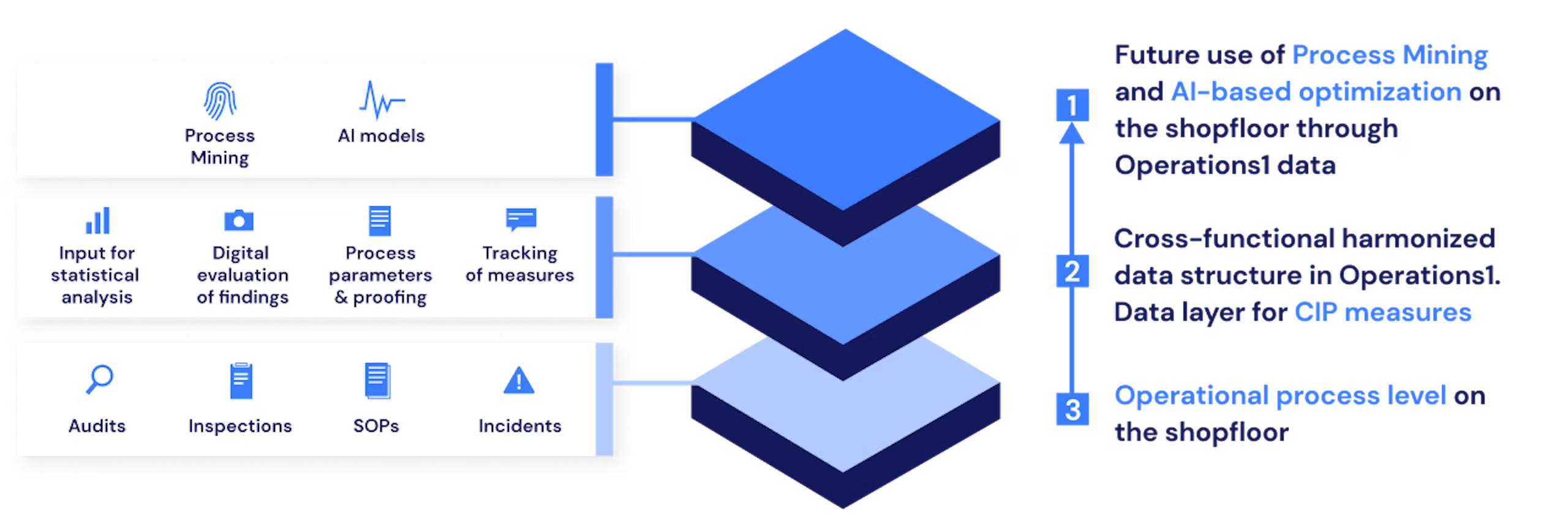
Variant configuration creates comparable process data, because every result can be assigned to a specific product variant, module version and process condition. Only that structure reveals whether a defect occurs generally or concentrates on particular characteristics and combinations.
In the quality inspection of an industrial furnace, the information "inspection failed" is not enough. For a root cause analysis, the team needs to know which power class, control system, component, inspection sequence and document version were involved.
A suitable data structure therefore captures at least:
Order and serial number
Product characteristics and values
Process variant and workstation
Executed modules and version states
Target values, actual values and inspection results
Timestamp and executing role
Type of deviation and the response initiated
A closed improvement cycle builds on that:
The improvement cycle in seven steps
Capture data variant by variant: employees document results directly during assembly or inspection.
Build comparable groups: analyses distinguish product families, characteristics, modules and sites.
Identify focal points: Pareto analyses show which variants and process steps cause the largest share of defects.
Investigate causes: Ishikawa, 5 Why or 8D structure the problem solving.
Update risks: findings feed into process FMEA, inspection planning and reaction plans.
Improve modules and rules: the team changes the specific content, limit value or selection mechanism concerned.
Verify the effect: the metrics after approval show whether the change reduced the defect sustainably.
Your own process data is an important factor for continuous improvement. Without a variant reference, though, different starting conditions blend together. That produces volumes of data, but no reliable insight.
Word processing tools and simple form generators are usually not enough for this task. They capture content and entries, but rarely maintain a consistent relationship between configuration, rule, module version and result. For continuous improvement in variant-rich processes, that relationship is exactly what counts.
Conclusion: variant configuration as the basis for scalable documentation
Variant configuration for work instructions and checklists connects product characteristics, process rules and modular content into precisely fitting operational documents. It replaces maximum lists and duplicated individual documents with centrally maintained, order-specific information delivery.
The greatest benefit does not come from digital display alone. What matters is the structured link between variant characteristics, work modules, inspection values, media and execution data. That reduces the effort for creation, change and translation. At the same time, people on the shopfloor receive exactly the information their current order requires.
Start with consistent master data, one clearly defined product family and comprehensible rules. Integration, pilot operation, metric comparison and step-by-step scaling follow. That gives you a solid basis for higher productivity, reliable processes and continuous improvement despite growing variant complexity.
FAQ
What are the alternatives without a full ERP integration?
Without a direct ERP integration, companies can supply variant characteristics through structured files or a dedicated database. The subsequent module selection and instruction generation follow the same rule structure as with a direct interface.
With a file import, a responsible person transfers configuration characteristics and order metadata in a structured format. The system then identifies the order, applies the rules and provides the modular instruction.
A dedicated database makes sense when the required characteristics are not reliably available in any other system. It does need clear owners, change processes and validation rules. Otherwise a further, contradictory data source grows alongside ERP and PLM.
For a pilot, a controlled CSV, XML or JSON import often works well. With high volumes, short cycle times or frequent technical changes, direct integration is the better choice because it reduces manual transfers and gaps in currency.
What role do images and videos play in variant-specific documents?
Images and short videos convey spatial, visual and movement-related information faster than long passages of text. Their value is highest when the variant configurator shows exactly the medium that belongs to the current component, tool and work step.
A photo marks the position of a connector, a graphic shows the correct installation orientation, and a short video demonstrates a demanding hand movement. Annotated images also support Poka Yoke when they clearly highlight mix-up risks or inspection locations.
Variant-specific media avoid a typical problem of central image libraries: people do not have to decide themselves which illustration matches the current version. The rule set links the medium directly to characteristic, module and version state.
Clear requirements apply for safe use:
The medium shows exactly the approved product and process variant.
Markings stay clearly visible on the device in use.
Videos are short, step-related and available offline where needed.
The responsible team approves file version and content module together.
Safety warnings, target values and inspection criteria are additionally available as unambiguous text or data.
Changed components trigger a review of the assigned media.
Images and videos do not replace technically precise instructions. They complement text, measured values and safety requirements wherever visual information improves understanding.