
When several deliveries arrive at your site in a single day, your team makes accept, hold, or reject decisions under time pressure. Paper-based inspection records rarely give you a data set you can search quickly, and they make it hard to answer follow-up questions about a specific delivery later. This article covers what a digital checklist for goods receipt inspection needs to deliver and how to plan the switch in a structured way.
Key takeaways
Under mutual commercial transactions, German commercial law (§ 377 HGB) requires prompt inspection and defect notification, regardless of the documentation format used.
Full inspection, sampling, and reduced or tightened inspection depend on criticality, FMEA results, and supplier history.
Media breaks, filing errors, and missing structured data in paper records slow down decisions and supplier evaluations.
Required fields, automatic timestamps, photo evidence, and interfaces to ERP and MES improve the quality of evidence and speed up response times.
A limited pilot with cleaned-up inspection documents and clear data ownership lowers the risk of the switch.
What is a digital checklist for goods receipt inspection?
A digital checklist for goods receipt inspection guides staff systematically through the quantity, identity, and quality checks of a delivery. It links the purchase order and delivery note to inspection results, measurements, photo evidence, timestamps, and the decision to accept, hold, or reject.
Goods receipt inspection determines whether delivered raw materials, operating supplies, semi-finished goods, or finished products match the original order. The main reference points are the purchase order, delivery note, agreed specifications, drawings, inspection plans, and quality agreements.
A digital goods receipt checklist turns these requirements into a guided inspection flow. Required fields, limit values, and decision logic ensure inspectors capture all relevant characteristics. When a deviation occurs, the software can request a photo, an error code, a quantity, and a decision on further use.
Typical inspection content covers:
supplier, purchase order number, delivery note number, and arrival time
article number, batch, serial number, and expiry date
delivered versus ordered quantity
condition of packaging, load carrier, and seal
visible transport or corrosion damage
dimensions, weight, material properties, and other quality characteristics
inspection tools used and the measurement method
sample size and result
accept, conditional accept, hold, or reject
photos, videos, comments, and complaint information
This makes the digital checklist part of operational quality management. It supports control of externally provided processes, products, and services under ISO 9001. In the automotive sector, it also supports the requirements of IATF 16949, customer-specific requirements, and agreed inspection plans. The standards do not prescribe a specific software solution. What matters is a controlled process, traceable approvals, and solid evidence.
What role does goods receipt inspection play in the value chain?
Goods receipt inspection acts as a quality gate at the start of the value chain. It stops shortages, wrong materials, or defective parts from moving unchecked into storage, manufacturing, and shipping.
Manufacturing and processing companies often source materials from many suppliers. Every supplier brings different specifications, packaging, load carriers, error risks, and evidence requirements. A consistent baseline process is important, but it needs to trigger different inspection depths depending on material, supplier, and risk.
Inspectors first compare the order, delivery note, and actual delivery. Then they check identity, quantity, and condition. Depending on the material, quality checks include measuring, weighing, counting, visual inspection, sampling, or material testing.
Whether a full inspection or a sample makes sense depends on risk:
Full inspection fits safety-critical characteristics, small delivery quantities, suppliers with a history of issues, or defects with high downstream costs.
Sampling fits larger, homogeneous lots with stable supplier quality and a defined sampling plan.
Reduced inspection makes economic sense for demonstrably stable processes with an agreed quality assurance approach.
Tightened inspection becomes necessary after complaints, process changes, supplier switches, or repeated limit violations.
For attribute-based acceptance sampling, ISO 2859-1 provides a systematic basis. The actual inspection intensity should also come from the FMEA, the criticality of the characteristic, past complaints, and customer requirements.
In practice, risk-based inspection planning works better than inspecting every delivery at the same intensity. Risk-based goods receipt inspection focuses limited inspection time on the materials and suppliers with the biggest impact on product safety, quality, equipment availability, and delivery reliability.
Why does paper-based goods receipt inspection fail in daily operations?
Paper processes fail mainly because of media breaks, manual filing, and a lack of transparency. When several deliveries arrive within a few hours, the documentation workload grows faster than the available inspection time.
Inspectors often work in parallel with printed orders, delivery notes, specifications, and handwritten checklists. Once the inspection is done, staff need to sign, sort, hand over, and file the paperwork. Deviations get reported to quality assurance and purchasing by phone, email, or a routing slip.
A single illegible note is not the real issue here. The underlying problem is the separation between the physical inspection and the later data entry. Every handoff creates extra work, slows down decisions, and raises the risk of incomplete information.
What problems come from paper stacks, filing, and archiving?
Paper records are only useful if staff fill them in completely, label them clearly, and file them in the right place. A lost or misfiled document breaks the chain of evidence.
Many goods receipt areas process several deliveries or entire truckloads within a tight time window each day. This produces large volumes of inspection records, delivery notes, packing lists, and shipping documents. Staff end up spending time sorting and filing instead of checking identity, quantity, and quality.
Follow-up questions expose this weakness most clearly. When purchasing needs to check the condition of a specific delivery, the search starts in folders, filing cabinets, and email inboxes. If the record is missing, all that is left is memory or unanswered questions to the people involved.
Changes also create extra work. Quality assurance has to print new checklists and pull outdated versions from every inspection area. If an old form stays at a workstation, staff may end up inspecting against outdated limits or specifications.
Why do paper records lack a usable data foundation?
Handwritten inspection results exist as documents, not as structured data. Without additional data entry afterward, you cannot reliably analyze error types, supplier performance, or quality trends.
A filed record answers a single question but does not feed ongoing reporting. As a result, quality assurance often notices too late that dimensional deviations, packaging damage, or shortages keep recurring with a particular supplier.
A solid supplier evaluation needs structured metrics: complaint rate, rejected quantity, delivery reliability, number of blocked lots, repeat defects, and response time to complaints. Paper does not provide this information without extra data entry.
The real issue goes beyond slower reporting. Missing data prevents a company from adjusting inspection scope and supplier management based on risk. Weak suppliers stay undetected longer, while stable suppliers keep getting inspected more intensively than necessary.
What advantages does a digital checklist offer over paper records?
A digital checklist improves traceability, data quality, and response speed. It archives results automatically, enforces the relevant inspection steps, and makes findings immediately available to quality assurance, purchasing, logistics, and manufacturing.
The value does not come from simply moving a paper form onto a tablet. An effective digital checklists software connects the inspection plan, order data, measurements, decision logic, and the follow-up process.
| Criterion | Paper record | Digital checklist |
|---|---|---|
| Completeness | Inspection steps and fields can be skipped | Required fields and conditional logic guide the inspector through the process |
| Legibility | Handwriting and abbreviations lead to follow-up questions | Structured entries and defined error codes standardize findings |
| Traceability | Search through folders, filing cabinets, and individual files | Search by order, delivery, batch, material, or supplier |
| Time evidence | Manually recorded and sometimes rounded times | Timestamps generated automatically from synchronized system clocks |
| Photo evidence | Separate photos without a reliable link | Photos and videos stay linked to the inspection order and the deviation |
| Updates | New forms need to be distributed, old ones collected | Approved versions are available centrally |
| Analysis | Requires additional manual data entry | Structured data flows directly into metrics and dashboards |
| Escalation | Phone, email, or a routing slip | Rule-based notification to defined roles |
| Archiving | Folders, storage space, and manual filing | Central storage under a defined permission and retention model |
| Interfaces | Media break to ERP, MES, and QMS | Automatic data exchange through defined interfaces |
Recommendation: Companies should not just replace paper with digital forms. They should design the full information flow. The biggest gains come when master data flows in automatically, measurements are captured in a structured way, and deviations trigger a defined follow-up process immediately.
How do digital photo records help enforce complaints?
Digital photos and videos document damage right at the inspection point and link it clearly to the delivery, article, and time. This gives purchasing faster, more reliable information for filing a complaint.
A strong photo record does not just show the damaged spot. It documents the context: an overview of the packaging, the label, the batch, the load carrier, the seal, and a close-up of the defect. Additional notes on quantity, defect type, and the inspection decision prevent follow-up questions.
Reliable documentation needs clear rules:
take photos directly within the related inspection order
clearly document delivery or batch identification
combine overview shots with close-ups
protect original files from uncontrolled editing
log the capture time and the person recording it automatically
define access, deletion, and retention rules
Digital photo evidence makes it easier to build a case against suppliers and carriers. Whether a photo proves a specific legal outcome in a dispute still depends on the overall context and the quality of the chain of evidence.
How does a digital identity replace a handwritten signature?
A personal login or scanner-based user recognition assigns every inspection step to a clearly identified person. This is how digital identity replaces the often illegible signature on a paper record.
The software logs who started an inspection, who recorded a measurement, who assessed a deviation, and who released a delivery. Roles and permissions prevent untrained or unauthorized people from making critical decisions.
Suitable identification methods include personal user accounts, employee badges, badge readers, or single sign-on. Shared group accounts do not work here because they remove the link to an individual person.
A digital identity is not automatically equivalent to a qualified electronic signature. For goods receipt inspection, a traceable user assignment with a change history is often enough. If a law, contract, or customer requires a specific signature format, the technical solution needs to meet that requirement separately.
How does a digital checklist connect to ERP and MES systems?
A digital checklist exchanges master, order, and inspection data with ERP, MES, QMS, or a warehouse management system through interfaces. A clean integration avoids duplicate entry and keeps every system aligned on the same status for a delivery.
The ERP typically provides the supplier, order, line items, target quantity, material number, and goods receipt document. The checklist adds inspection results, images, measurements, and usage decisions. It then passes information such as acceptance, hold status, actual quantity, or complaint details back to the connected systems.
An MES mainly needs the release status of the material. This stops blocked batches from entering a manufacturing order unchecked. A QMS takes in quality notifications, inspection lots, error codes, and corrective actions. The warehouse management system controls storage location, quarantine area, and material movement.
Before the technical build, the relevant teams need to settle on:
Which system owns supplier, material, and order data?
Which system creates the inspection order?
Where does the authoritative usage decision live?
Which status values and error codes apply across systems?
When does data transfer happen, immediately or on a schedule?
How does the process handle duplicates, transfer errors, and system outages?
Which data needs to stay available without a network connection?
Which roles can change inspection results or grant releases?
Depending on the system landscape, REST APIs, standardized message formats, webhooks, or existing ERP connectors all work as integration options. A point-to-point integration is enough for a tightly scoped process. Across multiple plants and many systems, an integration platform is usually the more stable option, since it monitors interfaces centrally and unifies data models.
A common mistake is integrating without clear data ownership. When ERP, QMS, and the checklist application each change the same status independently, conflicting information results. That is why a clear target model for data objects, status transitions, and error handling needs to exist before any coding starts.
How do you connect sensors like scales and scanners?
Scales, measuring equipment, and QR or barcode scanners feed values directly into the digital checklist. Automatic value transfer reduces transcription errors and links the measurement, inspection order, timestamp, and inspection tool.
Barcode and QR scanners capture things like material numbers, delivery notices, batches, serial numbers, or load carriers. Many scanners work as input devices, while more complex setups use device interfaces or mobile cameras. The application needs to verify that the scanned code matches the open order. Simply reading a code without a plausibility check does not prevent mix-ups.
Scales and measuring equipment deliver readings through serial interfaces, network protocols, manufacturer APIs, or industrial communication standards. The checklist compares the value against the target range and tolerance. If a limit is exceeded, it blocks the release and starts the defined deviation process.
Reliable measurement transfer needs a few things in place:
clear identification of the inspection tool
a valid calibration or inspection status
a defined unit and resolution
protection against manual overwriting, or a documented correction process
a plausibility and tolerance check
timestamps from synchronized system clocks
a clear way of handling connection drops
Direct sensor integration pays off especially for frequent measurements, units prone to mix-ups, and quality-critical characteristics. For rare inspections with changing lab equipment, controlled manual entry is often more economical. In that case, a second plausibility check or digitally importing an inspection report should safeguard the entry.
How do you switch from paper to digital goods receipt inspection, step by step?
The switch works when a company first clarifies the process, inspection requirements, and data ownership, and only then configures the software. A limited pilot reduces complexity and delivers solid learnings for the rollout.
Capture the current process and requirements. Quality assurance, goods receipt, purchasing, manufacturing, IT, and controlling document delivery types, documents, inspection methods, roles, and typical deviations. This also covers legal, regulatory, and customer-specific requirements.
Structure inspection scope by risk. The project team ranks materials and suppliers by criticality. FMEA results, complaint history, supplier status, and the consequences of a defect determine whether full inspection, sampling, or reduced inspection applies.
Clean up documents and master data. Quality assurance removes duplicates, outdated checklists, and conflicting limits. Material numbers, error codes, units, and supplier names need to be unambiguous before they go into the application.
Define the target digital process. The team maps out the flow from delivery to release or complaint. It sets required fields, conditional inspection steps, escalations, hold decisions, and backup rules as binding requirements.
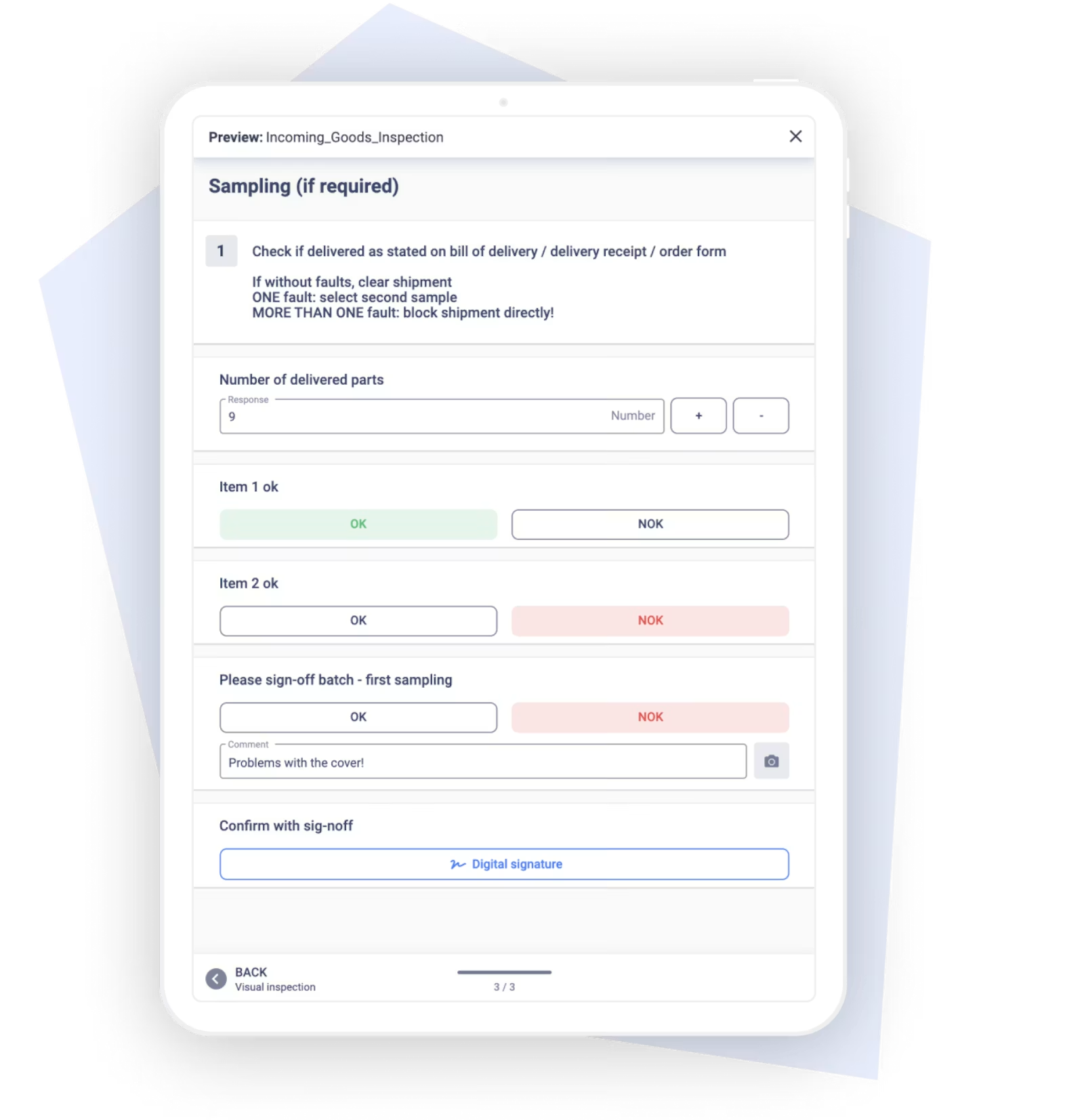
Configure checklists and decision logic. When creating a checklist, map the relevant documents digitally. The application should show inspection steps based on material, supplier, batch, or a prior result, and it should block releases when required fields are missing.
Connect ERP, MES, QMS, and devices. Interfaces transfer orders, inspection tasks, and status values. Scanners, scales, and measuring tools get integrated where automatic capture measurably reduces errors or processing time.
Run a pilot with real deliveries. A defined material area or goods receipt zone serves as the pilot. The team tests usability, data quality, offline behavior, escalations, and interfaces under real conditions.
Train staff. Training covers not just how to operate the tool, but also the purpose of the inspection, error classification, and how to respond to deviations. Champions on the shopfloor support the first shifts and collect improvement ideas.
Set up metrics and a dashboard. The dashboard shows inspection volume, cycle time, complaint rate, blocked lots, error types, and supplier trends, among other things. Every metric needs a clear definition and an accountable owner.
Manage rollout and continuous improvement. After the pilot, the project team standardizes the proven workflows and rolls them out step by step to more materials, suppliers, or sites. Continuous improvement work, audit findings, and 8D learnings feed back into new checklist versions in a controlled way.
Recommendation: Start with a representative but manageable pilot area. An immediate company-wide rollout multiplies the risk of unclean documents, unresolved roles, and faulty interfaces all at once.
How long does implementation take in practice?
In practice, a clearly scoped pilot with cleaned-up inspection documents and manageable interfaces can be implemented within a few weeks. A rollout across multiple sites takes longer because master data, devices, permissions, and system integrations all need to be aligned.
Duration depends less on the number of digital forms and more on process maturity. Outdated inspection plans, inconsistent article numbers, and unclear release rules extend the project significantly. Customer-specific requirements, offline use, and processes that require validation also add effort.
A realistic implementation plan separates three stages:
pilot with selected materials and users
stabilizing process, data, and interfaces
step-by-step rollout to further areas and sites
In practice, an early, working pilot beats a long concept phase without a shopfloor test. The condition is that the company treats the pilot as a learning step, not a final standard, and systematically evaluates and incorporates feedback.
How does Operations1 support digital goods receipt inspection?
The switch to digital goods receipt inspection rarely fails because of a lack of will. It fails on the question of how to translate existing inspection workflows into a digital process without adding extra clicks.
Operations1 maps checklists and inspection records as digital documents. Numeric inputs with limit values and real-time error detection, along with photo, video, and scanner interactions, support the relevant inspection steps.
Every completed inspection generates a report with a traceable chain of evidence. Users can filter reports by order, time period, or structure class and analyze them in the Analytics module.
Through the Order Connector, Operations1 pulls orders from ERP or MES systems automatically, while the Public API handles data exchange with connected systems.
When a deviation occurs, inspectors can create a task directly from the report, assign it to a responsible person or group, and track its status to completion.
Why is investing in a digital solution worth it?
The investment pays off when recurring documentation work, search time, error costs, and delayed quality decisions exceed the running cost of the digital solution. The benefit is highest with many deliveries, demanding evidence requirements, and frequent complaints.
Paper looks cheap at first glance, since printouts and folders carry only small per-unit costs. That view leaves out process costs. Staff create forms, transcribe data, search for records, clarify illegible entries, and maintain reports manually.
A digital solution, by contrast, comes with visible costs for software, devices, implementation, interfaces, support, and training. In return, it reduces recurring tasks, automates evidence, and makes quality data available for decisions.
The right time for digital quality control has arrived when paper visibly limits the process. Typical signals include growing document volumes, repeated search efforts, missing supplier metrics, inconsistent inspection plans, or heavy reliance on the experience of individual staff members.
A solid business case should account for at least the following:
number of goods receipts and inspections per month
average processing and filing time per inspection
effort for searching, follow-up questions, and later data entry
cost of printing, paper, folders, and archive space
number and cost of documentation-related errors
effort for complaints, sorting, and repeat inspections
cost of software, devices, interfaces, and operations
time saved through faster hold, release, and complaint decisions
How do the costs of paper and digital goods receipt inspection compare?
Paper carries low entry costs but steadily rising labor, archiving, and error costs. A digital solution requires an upfront investment, but it lowers the cost per inspection and builds a reusable data foundation.
| Cost area | Paper-based inspection | Digital inspection |
|---|---|---|
| Implementation | Low technical effort | Configuration, devices, interfaces, and training |
| Ongoing operation | Printing, distribution, filing, and manual upkeep | Licenses, support, device management, and system operations |
| Labor | High effort for transcription, sorting, and search | Focus on inspection, assessment, and improvement |
| Archiving | Folders, storage space, and physical access | Storage, permission, and retention model |
| Changes | Reprinting and replacing old versions | Central release and controlled versioning |
| Error costs | Lost documents, skipped steps, transcription errors | Required fields, plausibility checks, and automated data capture |
| Analysis | Extra entry into spreadsheets or BI systems | Structured data available directly |
| Scaling | Documentation effort grows with inspection volume | Additional inspections reuse existing structures and interfaces |
A blanket payback period is not credible without process data. Companies should build a business case with their own volumes, full costs, and error consequences. What matters most is not the paper saved, but the freed-up expert time and the earlier prevention of quality costs.
What value do digital goods receipt data provide for supplier evaluation and decisions?
Digital goods receipt data make supplier quality measurable and comparable. Purchasing and quality assurance spot repeat defects, evaluate suppliers against consistent metrics, and adjust inspection strategy and ordering behavior with intent.
Useful metrics include:
share of deliveries with complaints
rejected quantity by supplier or material
number of blocked lots
shortages and overdeliveries
frequency of individual defect types
repeat defects after a closed 8D process
response and processing time for complaints
delivery reliability and completeness of accompanying documents
how inspection results trend over time
Metrics always need context. A supplier of safety-critical components is not directly comparable to a supplier of non-critical consumables. A high inspection frequency also distorts comparisons if other suppliers are inspected less often or at a reduced level.
In practice, a risk-weighted supplier evaluation works well. It combines quality findings with material criticality, delivery volume, delivery reliability, and responsiveness. Based on this, a company decides on reduced or tightened inspection, supplier audits, development measures, or resourcing.
Ending a supplier relationship should not follow from a single deviation. Repeated critical defects, ineffective corrective actions, or systematic contract violations, on the other hand, provide a solid basis for escalation and sourcing decisions.
Order quantities can also be coordinated better. Frequent quality issues argue against large lots, since they raise inventory and hold risks. With stable supplier quality, reliable delivery performance, and matching storage capacity, larger or less frequently inspected lots make more economic sense.
How do manufacturing, purchasing, and controlling benefit from the data?
Manufacturing, purchasing, and controlling gain a shared data foundation for material releases, supplier negotiations, and quality costs. This lets each function make decisions based on the same findings instead of separate lists and individual reports.
Manufacturing sees early on whether material is released, held, or usable only under conditions. This improves sequence planning and stops unreleased batches from showing up at the line.
Purchasing uses error histories, quantity deviations, and response times in supplier conversations. Concrete data strengthens the negotiating position and makes it easier to verify agreed corrective actions.
Controlling ties sorting costs, scrap, expedited shipments, and production interruptions back to suppliers or defect types. This makes it visible that a low purchase price does not automatically mean low total cost. For a reliable comparison, though, a company needs to use the same definitions and cost allocations consistently across teams and time periods.
Management sees in the dashboard which suppliers and materials carry the biggest operational risk. Detailed data stays with the relevant teams, while aggregated metrics support decisions on supplier development, ordering strategy, and quality assurance capacity.
How does digitization affect employee satisfaction and adoption?
A well-designed digital checklist reduces the time spent writing, searching, and filing, and it gives inspectors faster feedback on what to do next. Adoption only happens when the solution simplifies the real inspection process instead of adding extra clicks.
Staff capture damage right at the inspection point, add comments, and pass findings on without a media break. Quality assurance, shift leads, or purchasing see the information immediately and decide on a hold, re-inspection, or complaint. This shortens walking routes and follow-up questions.
Digital guidance also helps new and less experienced staff. Images, limit values, inspection instructions, and error-proofing logic make expectations clear. That said, the software should not replace expertise with rigid click sequences. Unusual findings still need comment fields and a clear escalation path.
Five factors drive high adoption:
involve goods receipt and quality assurance staff early
design interfaces for gloves, lighting conditions, and mobile use
only capture data that serves a real technical or legal purpose
make feedback and escalations visible
communicate and train on checklist changes in a controlled way
A common adoption mistake is a digitized paper form with too many input fields. A good checklist uses automatic data population, scanners, pre-selection, and conditional logic. Staff only document what the system does not already know.
Data protection and monitoring also need to be clearly regulated. Personal time and activity data must not be analyzed without a defined purpose and clear permissions. Works councils, data protection officers, and information security should be involved early.
How does a digital checklist make goods receipt inspection future-proof?
A digital checklist makes goods receipt inspection future-proof when it standardizes inspection processes, links evidence without gaps, and provides structured data for supplier management and quality improvement. It replaces paper not just as a storage medium, but connects inspection, decision, and follow-up process.
The biggest operational benefit lies in reacting to deviations sooner. Required fields ensure completeness, photos strengthen complaint documentation, user identities provide accountability, and interfaces keep ERP, MES, QMS, and warehouse management aligned on the same information.
For a successful rollout, companies should start with a clearly scoped pilot, clean up inspection documents beforehand, and define data ownership as a binding requirement. Sensors and broader system integrations should follow where they measurably reduce transfer errors, processing time, or quality risk.
Process quality remains the deciding factor. A digital solution does not fix conflicting limits, unresolved release rules, or unsuitable sampling plans. Once those foundations are in place, work time shifts from filing and searching for information toward proper inspection, root cause analysis, and supplier development.
What legal obligations apply to goods receipt inspection?
Under § 377 of the German Commercial Code (HGB), a buyer in a mutual commercial transaction must inspect goods promptly after delivery, as far as this is feasible in the ordinary course of business, and must notify the seller of any recognizable defects without delay. For hidden defects, the notification period starts once the defect is discovered.
The common shorthand that every company must fully inspect every delivery immediately goes too far. The scope and timing of inspection depend on factors including the parties' status as merchants, the type of contract, the goods, the nature of the defect, the delivery quantity, and what is reasonable. Contractual quality agreements, industry-specific rules, and customer-specific requirements add to the statutory framework.
Digital inspection documentation does not replace a legal assessment. It does help a company document inspections, deviations, timing, and notifications in a traceable way.
What does prompt inspection under German commercial law mean, and what happens if a company misses it?
A recognizable defect must be inspected and reported within the time the ordinary course of business allows. If a company misses the deadline for notification, the goods are generally deemed accepted under § 377 HGB, unless a statutory exception applies.
In practice, this means a company needs a defined process from delivery to defect notification. That includes clear responsibilities, inspection methods matched to risk, escalation rules, and a documented way of informing the supplier.
For visible damage, inspectors should document the condition immediately. Photos need a clear link to the delivery, packaging, batch, and inspection order. Depending on the finding, the next step is conditional acceptance, a hold, rejection, or an agreed special release. Whether the recipient may or should reject a delivery depends on the contract, the defect, and who bears the risk at that point.
Hidden defects often only appear during processing, assembly, or material testing. Once discovered, the company must secure the findings and inform the supplier without avoidable delay. A late notification puts the buyer's rights at risk.
The blanket claim that defective goods must always be paid for in full whenever an inspection was missed is legally too broad. What holds up is this: a missed or late defect notification under the HGB regularly means the buyer loses their rights regarding that specific defect.
Which accompanying documents should companies keep on record?
Companies should capture every document that proves the identity, scope, condition, and handover of a delivery. Which documents fall under statutory retention or evidence requirements depends on the document type, the business transaction, tax law, customs law, and industry-specific rules.
Relevant accompanying documents include:
carrier handover records and freight documents
packing lists and delivery notes
inspection certificates, certificates of conformity, and material certificates
temperature or transport logs
customs and import documents for international deliveries
photos of packaging, load carriers, seals, and damage
inspection records, hold decisions, and releases
complaints and communication with suppliers or carriers
A digital solution should not simply store these documents as loose files. It should link every document clearly to the order, delivery, article, batch, and inspection process. A defined permission structure, versioning, retention rules, and an audit trail all strengthen the chain of evidence.
In practice, a document and retention matrix works well. Quality management, purchasing, logistics, tax, customs, and legal counsel agree on how long each document class is retained, in what format, and with what access rights.
What financial and legal risks come with undetected defects?
Undetected shortages, transport damage, and quality deviations shift costs from goods receipt into storage, manufacturing, and the customer relationship. At the same time, gaps in inspection weaken a company's position against suppliers, carriers, and its own customers.
Missing quantities often only surface during picking or when production draws on the material. At that point, there is no solid evidence of whether the shortage already existed at delivery. The result is reordering, production interruptions, or delayed schedules.
Quality defects usually get more expensive once the material is stored or processed. Possible consequences include:
sorting actions and additional inspections
blocked stock
scrap and rework
equipment downtime and lower OEE
expedited shipments and replacement sourcing
delays in manufacturing and delivery
customer complaints and 8D processes
traceability effort across mixed batches
product liability and damage claims
When a company resells or processes defective goods, it remains liable to its own customer under the relevant contractual and statutory rules. If it ignored recognizable warning signs or failed to reasonably limit damage, this can further weaken its position when seeking recourse. A reliable assessment always requires reviewing the specific contract and the actual damage case.
For hidden defects, batch and serial number traceability is critical. Without a clear match, a company cannot precisely narrow down the affected stock. It then either blocks more material than necessary or risks not fully capturing material that has already been processed.