How KraussMaffei has succeeded in end-to-end process mapping
-67% documentation effort
-1,200 annual working hours
0 scanned paper mountains
- View story
With Operations1, digital checklists become a controllable foundation for standardized, audit-proof, and scalable inspections.










Reduce documentation effort by up to 67% by eliminating the need to explain or piece together inspections after the fact.
Reduce process deviations by up to 50% by ensuring inspections follow a clear process and are no longer interpreted differently.
Reduce unplanned downtime by up to 60% by detecting deviations early instead of only when failures occur.
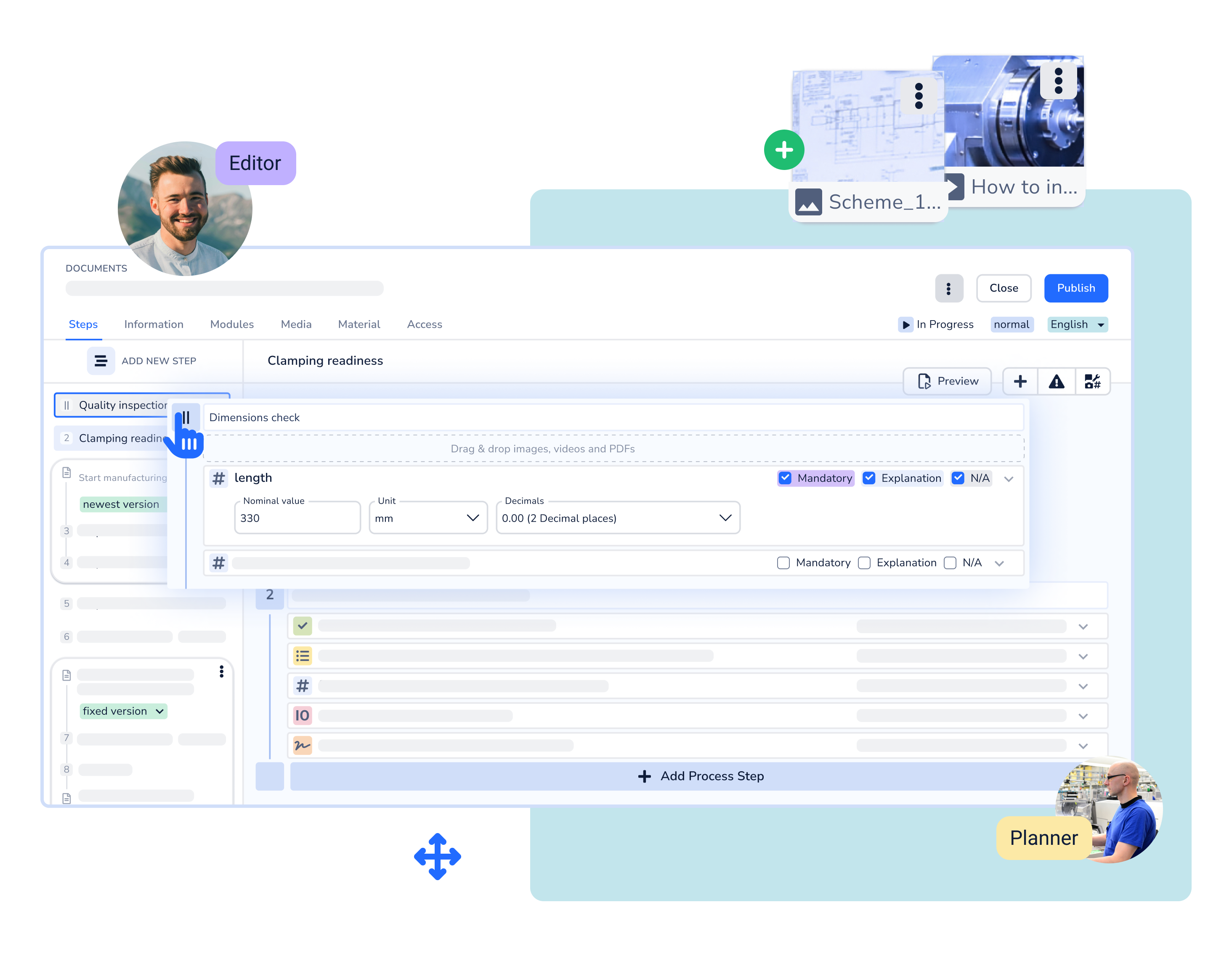
Transfer inspection and documentation processes into digital checklists and create a reliable foundation for scalability and comparability. Replace paper-based, unstructured templates with a central single source of truth.
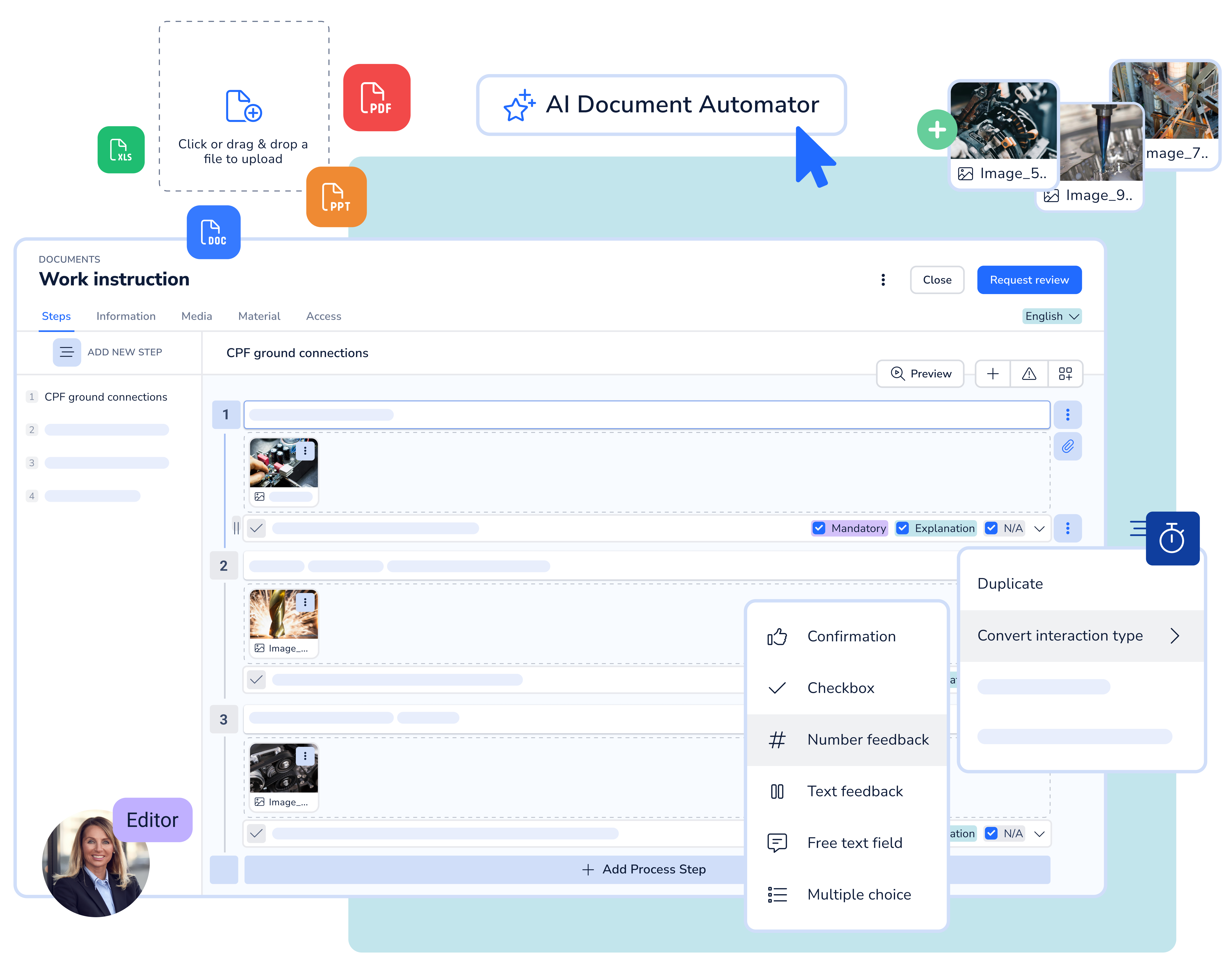
No-code creation of checklists and report templates using an intuitive drag-and-drop editor
Embed images and videos in checklists and edit them easily
Add a wide range of interaction types such as checks, multiple choice, measured values, and text inputs
Use reusable, standardized templates for inspection and documentation processes
Digitize existing checklists and reports using AI and make current content immediately system-ready. Accelerate the transition from paper and Office documents to digital inspection processes without time-consuming rework.
AI-based conversion of Word, Excel, PowerPoint, and PDF files
Structured transfer of inspection steps and record content
Central consolidation of different template formats
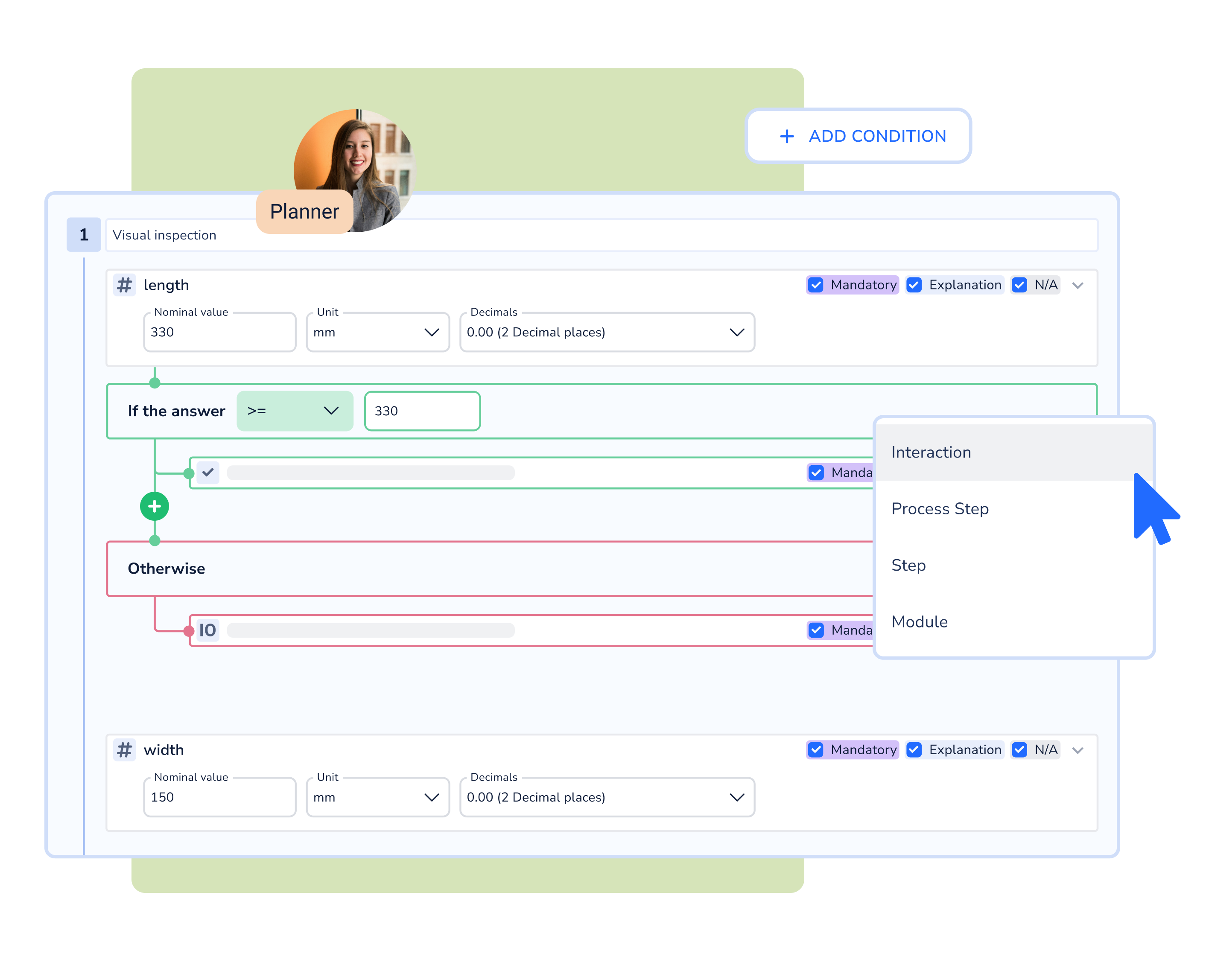
Use digital checklists with integrated process logic to guide employees safely through inspection and control processes. Reduce incomplete or incorrect records through mandatory fields and clear step-by-step guidance.
Structured step-by-step guidance
If-then logic for context-dependent inspection paths
Mandatory fields and validation logic
Measured value capture with limit values and OK/NOK logic
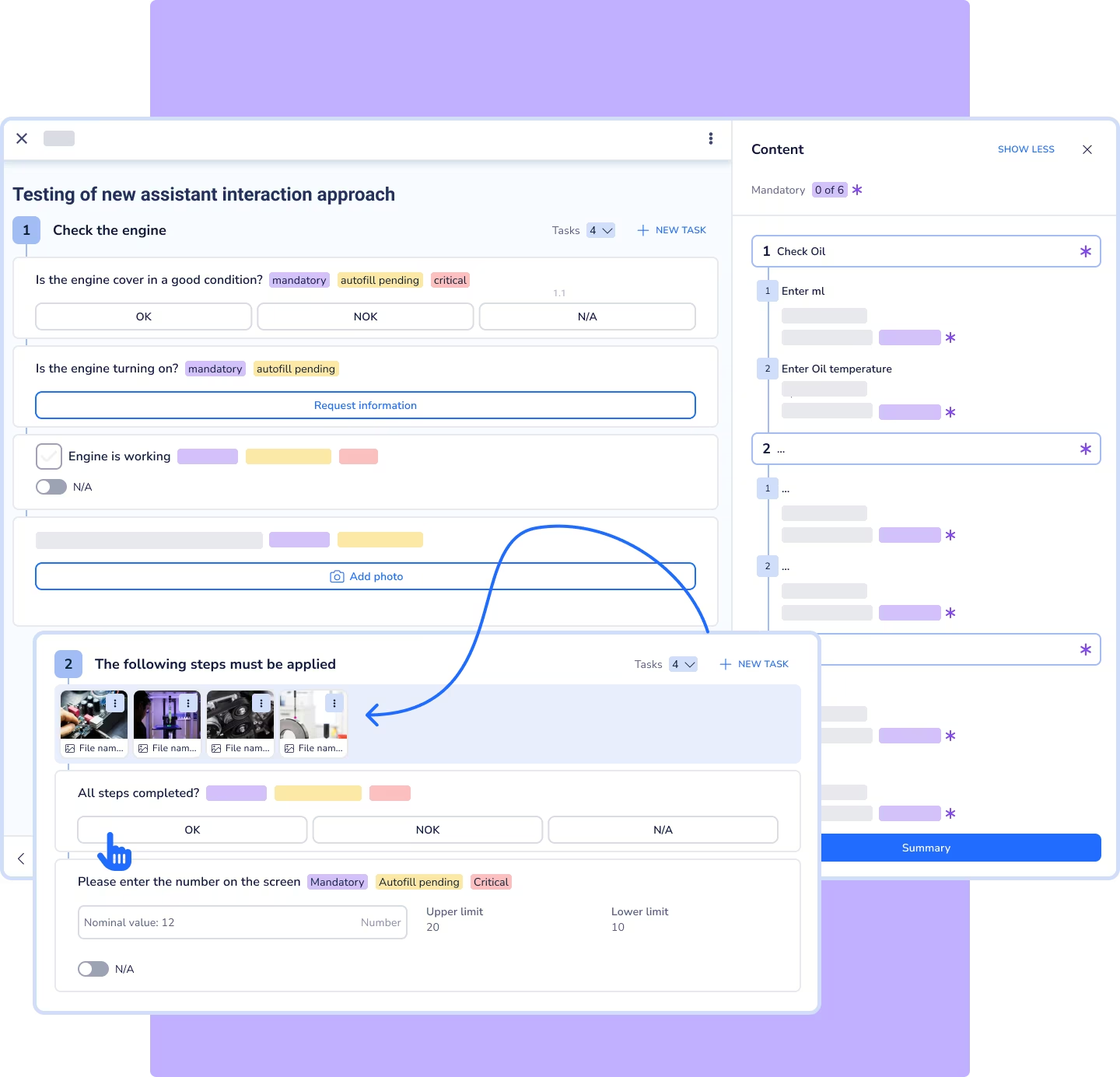
Provide workers with digital checklists directly in manufacturing via tablet or smartphone. A clearly structured user interface supports simple and reliable use in demanding shopfloor environments.
Mobile app for tablet and smartphone (Android and iOS)
Intuitive, shopfloor-optimized user interface
Camera use for photos, videos, and QR code scans
Reliable offline use
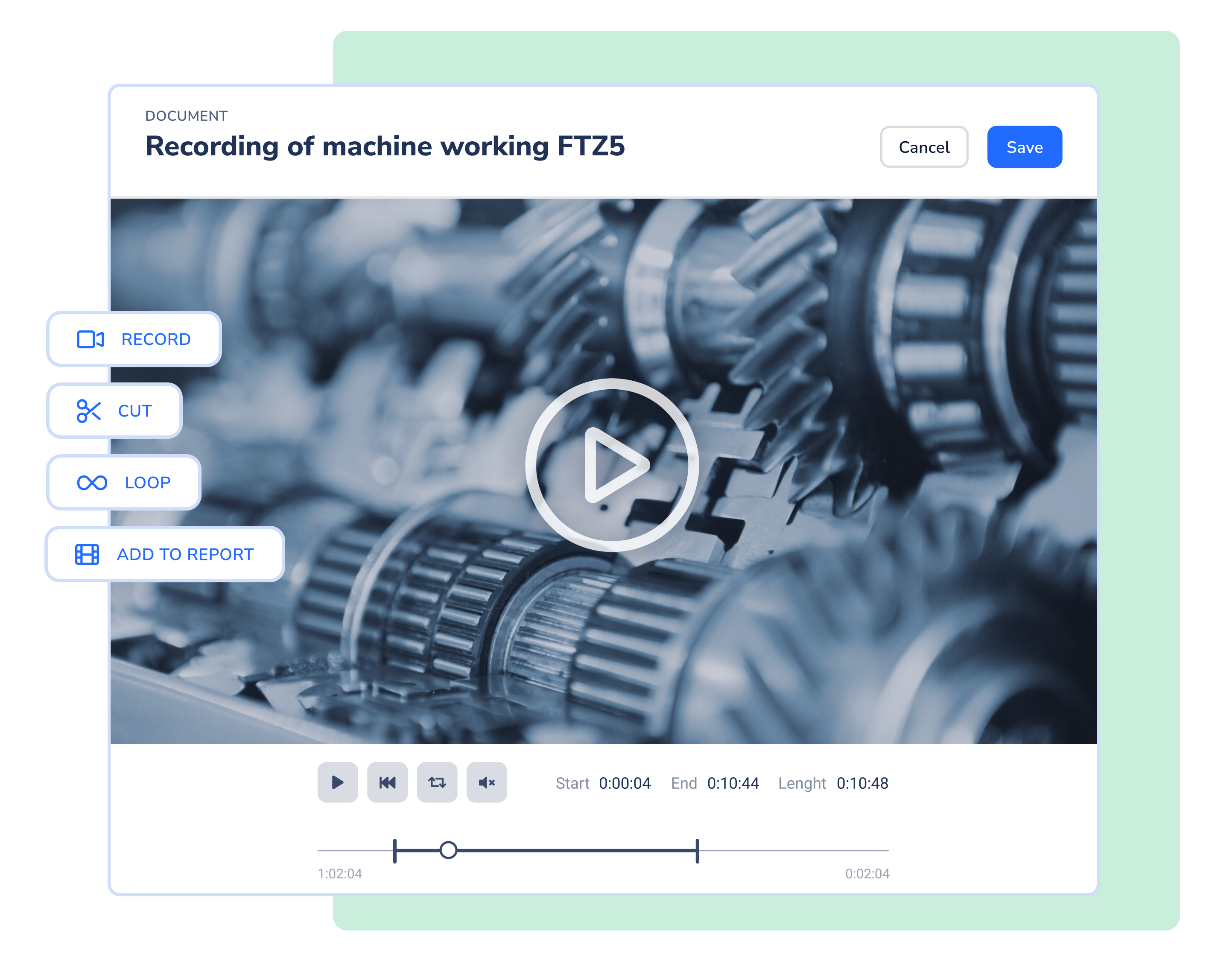
Enable workers to capture findings and deviations visually directly in the inspection context. Reduce follow-up questions and coordination effort through meaningful photos and videos within each inspection step.
Capture photos and videos for precise description of findings
Edit images with markings to clearly highlight deviations
Structured assignment of media to the inspection step
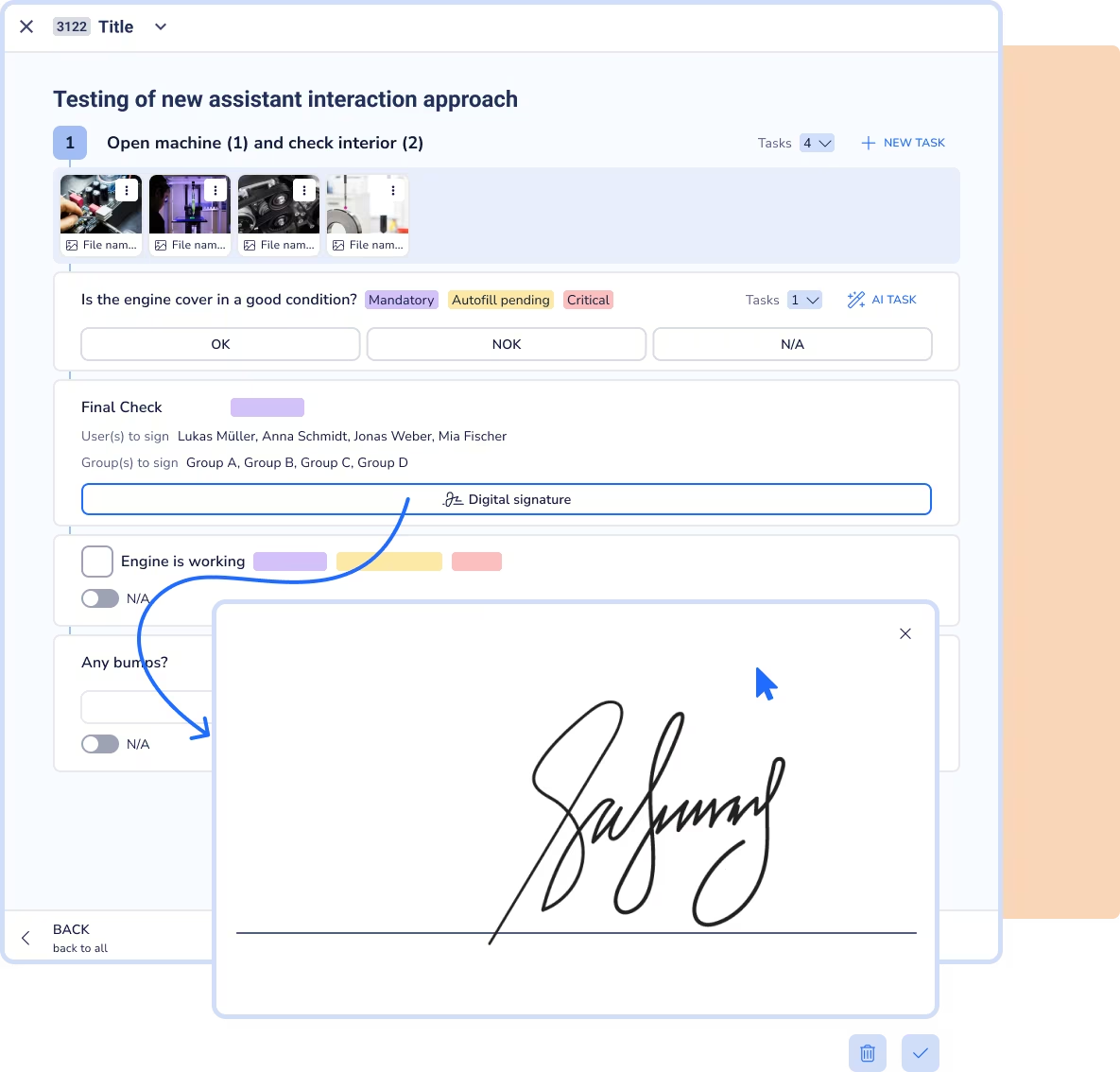
Make responsibilities in inspection and acceptance processes transparent and verifiable. Secure reports with digital signatures and defined approval steps.
Digital signature fields per inspection step or report
Digital signatures via touch or pen on mobile devices
Workflow logic for completed and approved reports
Mapping multi-level approval processes (Multi-Level Reviews)
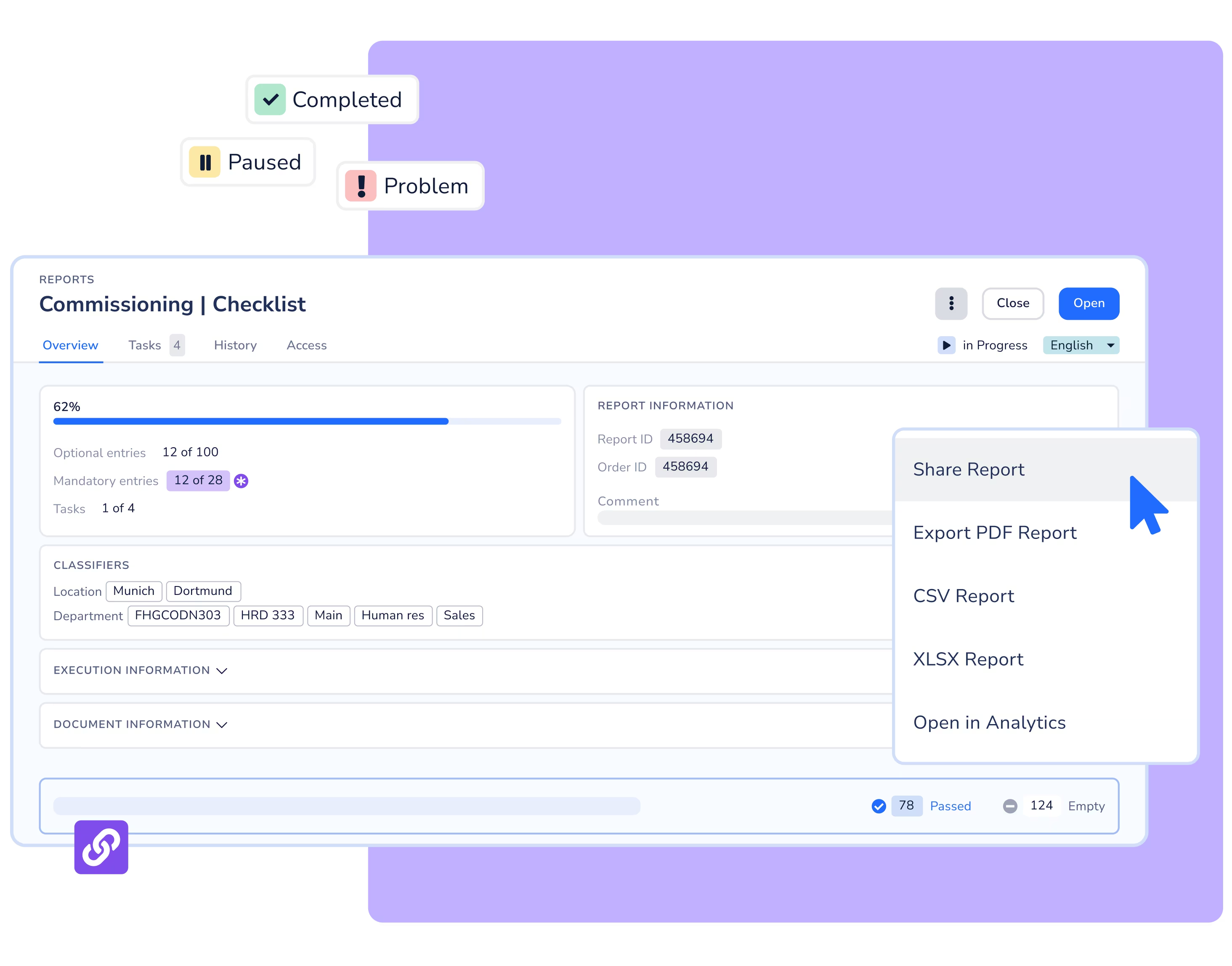
Automatically generate inspection reports directly from the digital checklist. Ensure complete traceability of all inputs, media, and changes for audits and evidence.
Generation of digital reports without manual post-processing
Export of reports, for example as PDF
Central storage and archiving of completed reports
Interaction history with timestamps
Audit trail for changes, versions and approvals
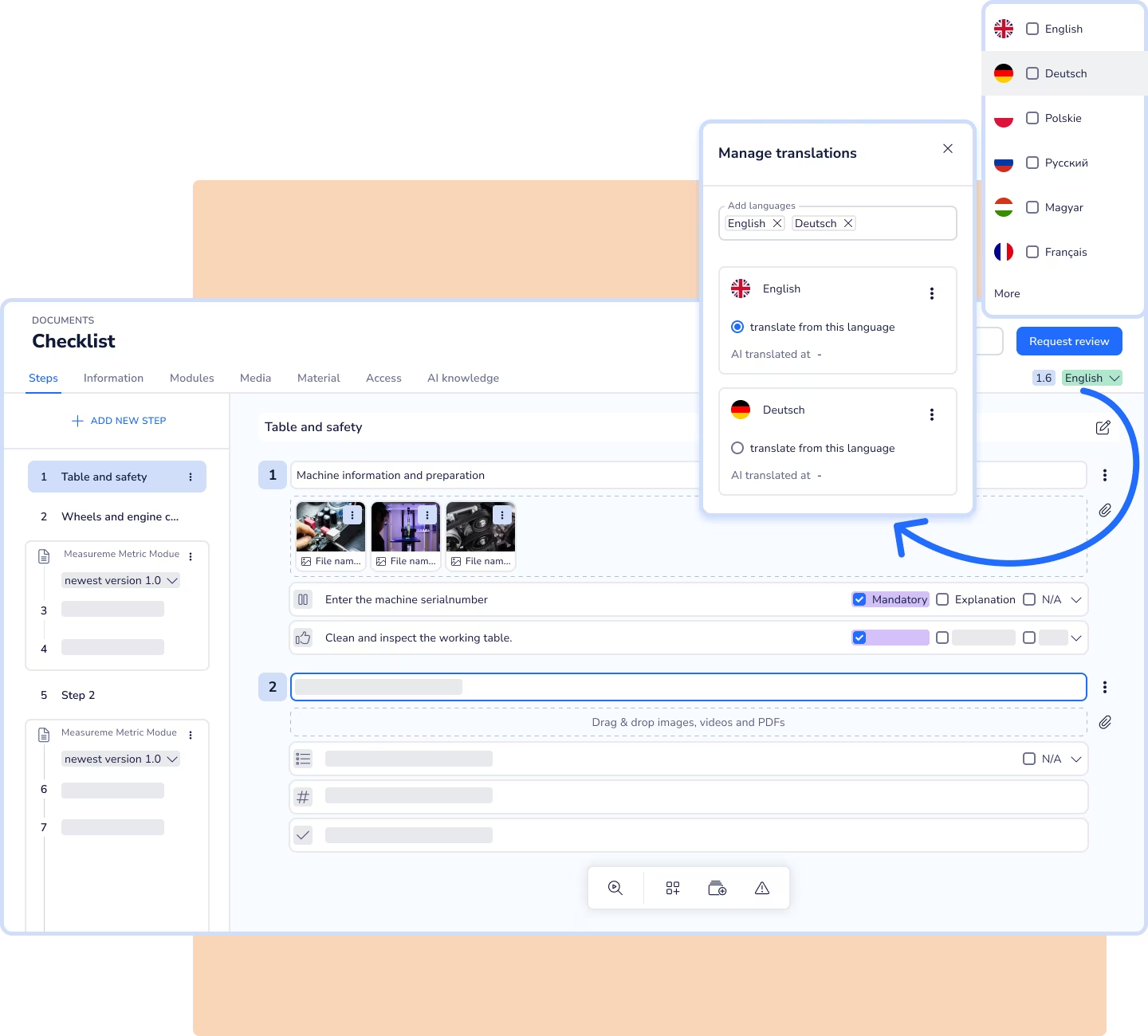
Create a scalable foundation for consistent inspection processes in international organizations. Ensure that all sites work with identical, language-adapted content.
Automatic AI-based translation of checklists
Central content maintenance across all languages
Use in the respective working language
Seamlessly transfer identified deviations into concrete tasks. Ensure that issues are handled in a traceable way and do not get lost.
Creation of tasks directly from checklists and reports
Assignment of tasks with clear responsibility
Status and priority tagging for actions
Documentation of corrective and follow-up actions

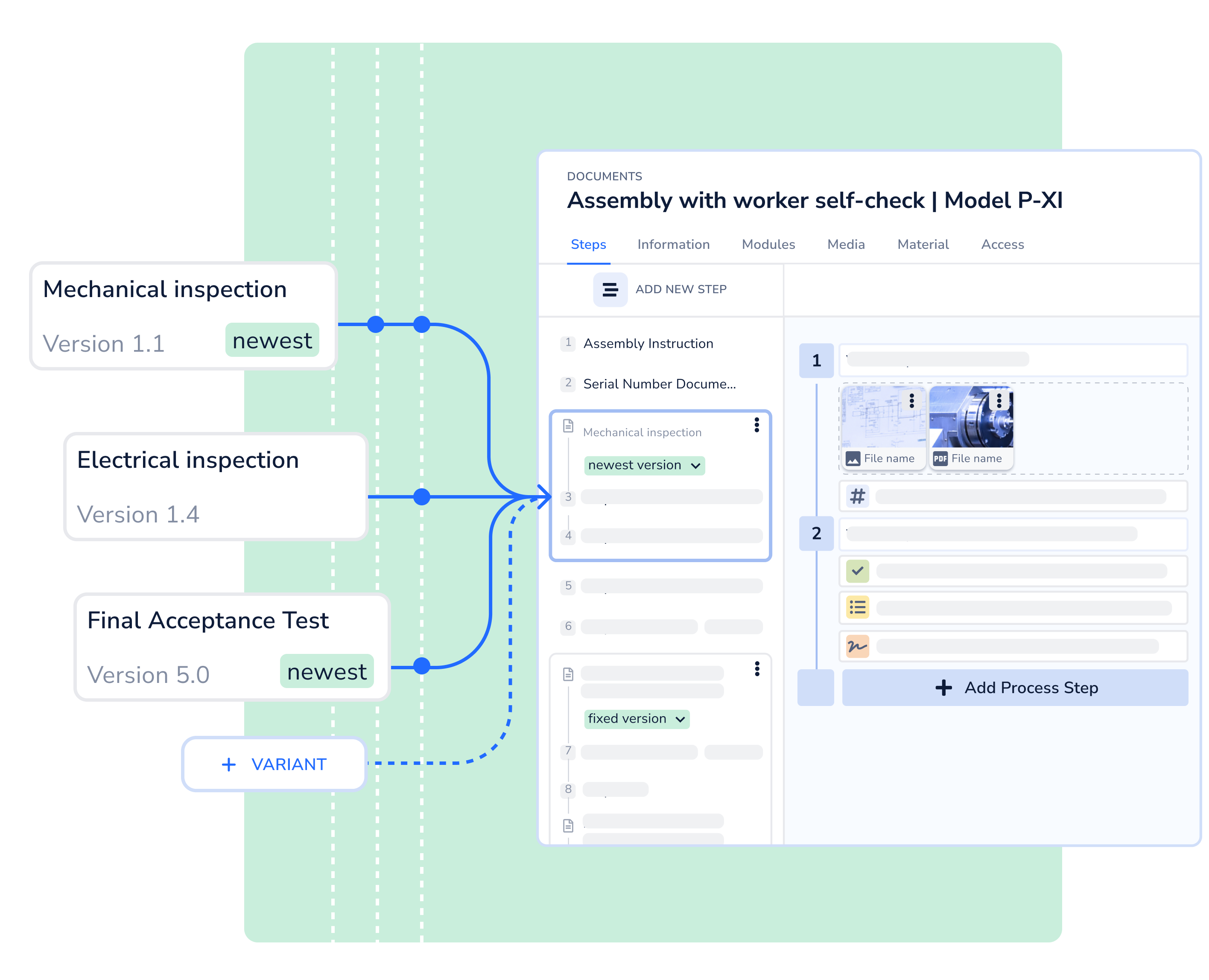
Manage variant diversity in inspection processes without increasing complexity for workers. At the same time, ensure that content is maintained consistently and efficiently across all variants.
Context-dependent control of inspection steps within checklists
Precise mapping of product, machine, and order variants
Reusable modules for identical inspection content
Central maintenance of modular content
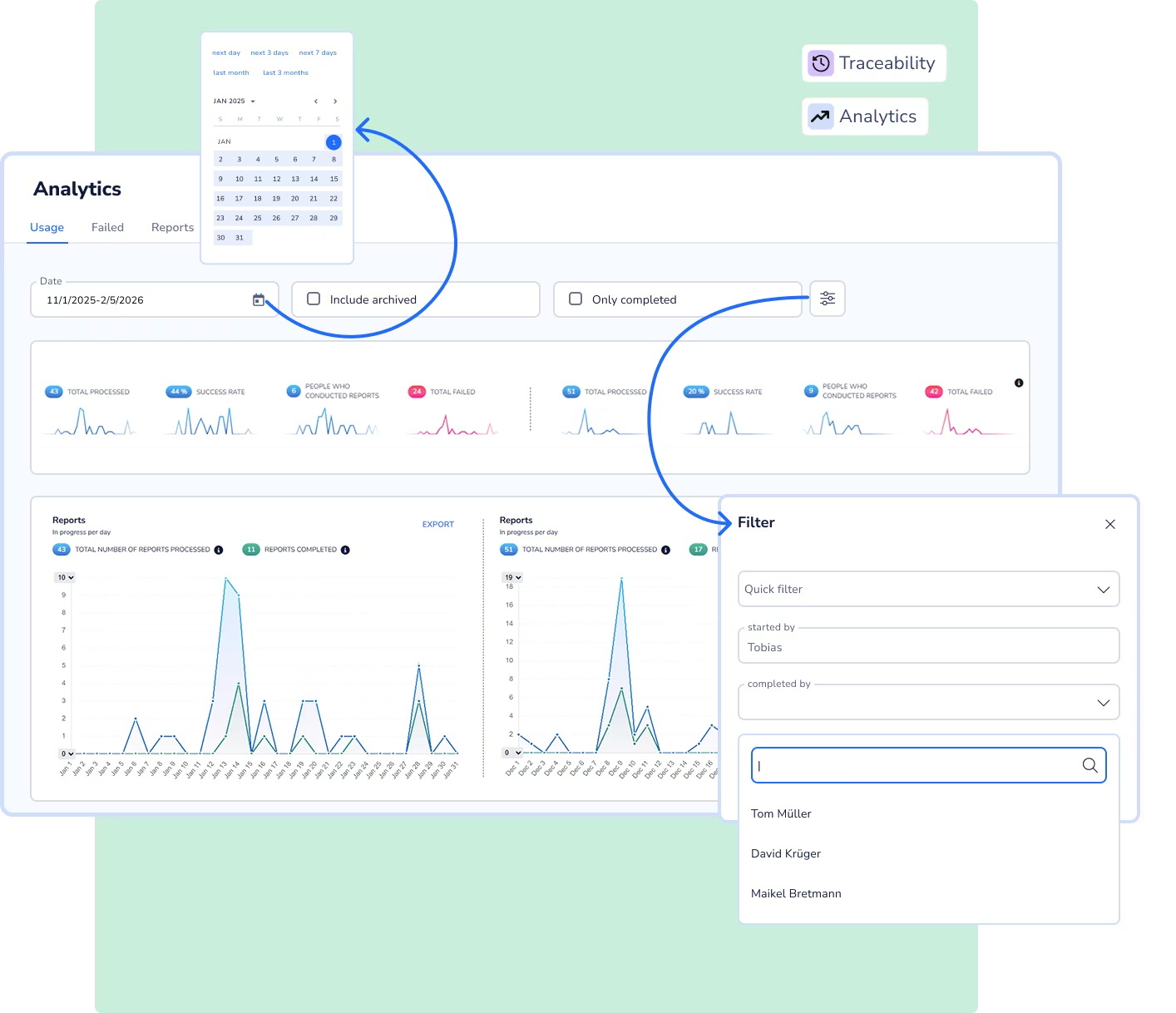
Use data from checklists and reports to systematically analyze quality, processes, and workflows. Create transparency around defect patterns, cycle times, and anomalies as a basis for continuous improvement.
Analytics on report usage, defect rates, and process times
Structured analysis of defect patterns and related findings media
Comparability of inspection results across time periods, products, and sites
Benchmarking of standardized, recurring inspection processes
Reliable data foundation for continuous improvement (CIP)
Create seamless inspection processes from planning through to feedback in leading systems. Integrate digital checklists into your system landscape and establish a scalable end-to-end structure.
Seamless integration with ERP, MES, and third-party systems (e.g. SAP)
System integration via APIs, webhooks, and standard connectors
Use of existing master data and order data
Seamless feedback of inspection results to leading systems

Automatically generate audit-ready reports from digital checklists and keep them centrally available.
Ensure that quality inspections are carried out in a standardized, complete, and comparable way across all sites.
Capture deviations directly in the inspection context and document them in a traceable way instead of on paper.
Carry out commissioning safely and document all inspection and approval steps fully digitally.
Standardize maintenance and setup processes and document them consistently and traceably.
Replace paper-based forms with digital checklists and create a central documentation foundation.




Discover why market leaders like Trumpf or Daimler Truck maximize their productivity with Operations1.

Guided tour of the software
Answers for your individual use-cases
Free of charge and non-binding
Digital checklists can be mapped in a variant-specific way by showing or hiding inspection steps depending on the context. Product variants, machine types, or order characteristics automatically determine which content is relevant in each inspection process.
In Operations1, variant management enables a structured mapping of complex variant logic without unnecessarily complicating the checklist for workers. Reusable modules and centralized maintenance ensure that changes automatically take effect in all linked checklists.
Digital checklists can be created with AI by automatically recognizing and structuring content from existing documents such as PDFs or Office files. Inspection steps, input fields, and content are transferred into a digital checklist structure.
In Operations1, this process is handled by the AI Document Automator, which quickly digitizes existing checklists and makes them centrally available. This eliminates the need for time-consuming manual recreation.
Digital checklists can be created by structurally modeling inspection and documentation processes in checklist software. Inspection steps, input types, and mandatory fields are clearly defined to ensure complete records.
In Operations1, digital checklists are created using an intuitive no-code editor with drag-and-drop functionality. Content is versioned centrally and then made available mobile and across sites.
Existing checklists can be digitized by converting paper forms, PDFs, or Excel files into structured, system-guided digital checklists. Inspection steps are not only transferred but enhanced with logic, mandatory fields, and clear process guidance.
In Operations1, the AI Document Automator supports the AI-based conversion of existing checklists from common Office formats and PDFs. Different templates are centrally consolidated and transformed into a uniform structural format.
Digital checklists are suitable for all use cases where inspection and control steps need to be carried out and documented in a structured way. Typical areas of application include quality inspections, acceptance records, safety checks, maintenance inspections, and checklists in plant engineering.
In Operations1, digital checklists are used to execute these processes consistently, mobile, and across sites. Structured data capture creates transparency and comparability across time periods, products, and locations.
Digital checklists are software-based inspection and documentation formats that guide users step by step through defined control or acceptance processes. Unlike paper lists or simple files, they capture inputs in a structured way, including timestamps, responsibilities, and media.
Operations1 provides digital checklists as a central single source of truth and ensures consistent content across all plants. This creates standardized, audit-proof records that are generated directly from execution.
Software for digital checklists delivers its full value when it maps inspection processes holistically and supports them operationally. It connects creation, execution, documentation, and analysis in one continuous system and replaces fragmented point solutions.
In Operations1, this results in clear benefits: digital checklists are maintained centrally, used mobile, and automatically converted into audit-ready records. Mandatory field logic, process guidance, and media integration ensure complete, high-quality inspection results.
The immediate availability of structured data enables reliable analysis, reduces audit effort, and creates a scalable foundation for quality management, compliance, and continuous improvement.
Software for digital checklists provides functions to fully map, execute, and reliably document inspection processes digitally. This includes a form editor for no-code creation, mandatory field logic, process guidance, and the integration of images and videos directly within the inspection step.
In Operations1, digital checklists are versioned centrally, used mobile on the shopfloor, and automatically converted into structured inspection records. Audit trails, timestamps, and role information ensure audit-proof documentation and audit readiness.
In addition, analytics functions enable the evaluation of defect patterns, cycle times, and anomalies, creating a solid basis for quality management, compliance, and continuous improvement.